
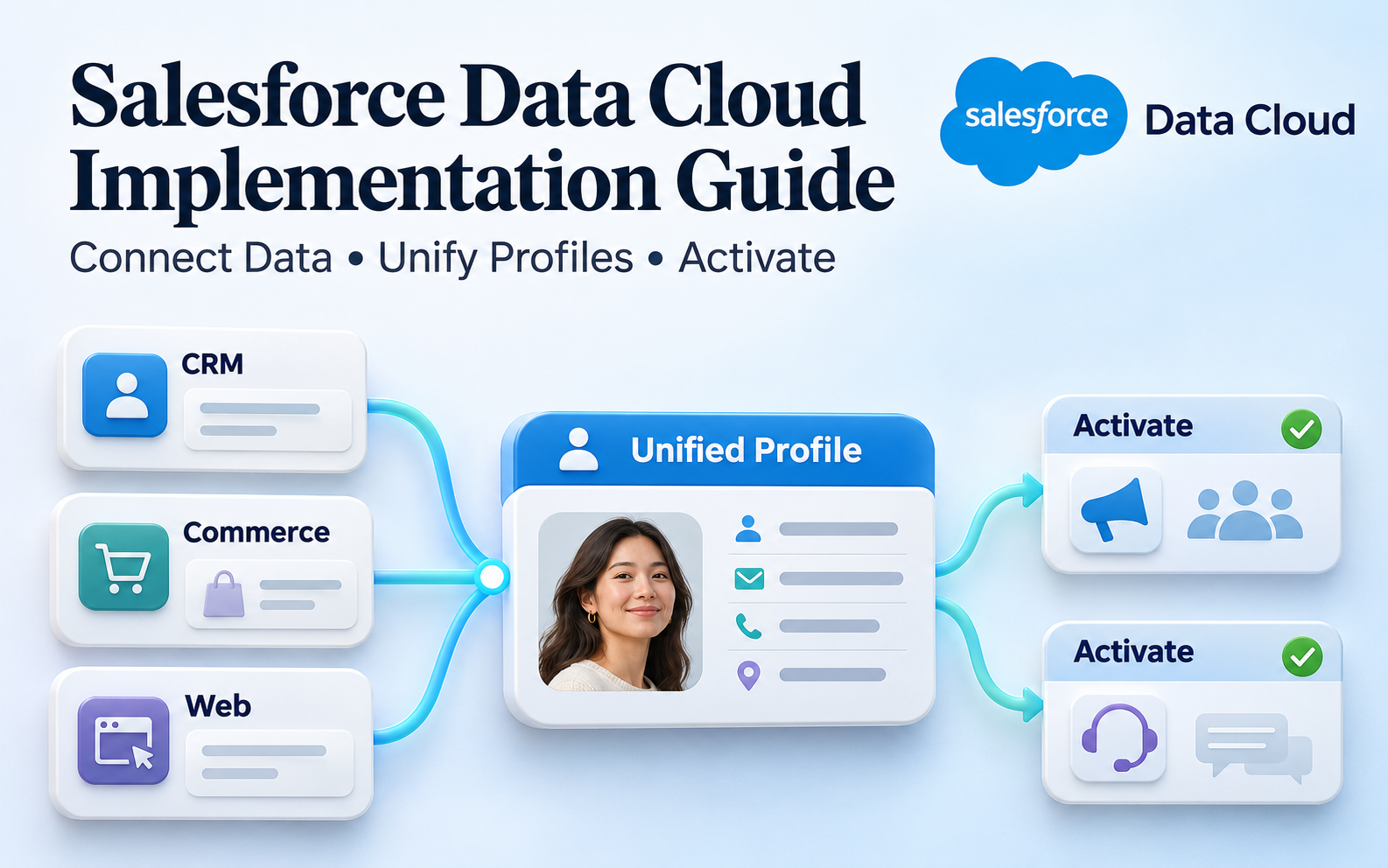
When customer data is scattered across CRM, transaction, website, and service systems, organizations may be able to produce reports but still struggle to turn the information into coordinated action. A Salesforce Data Cloud implementation should begin with a clear use case, followed by data, identity, and activation processes. This guide covers the main steps from planning to launch and helps teams define deliverables they can validate.
Summary
Implementing Data Cloud involves connecting sources, establishing a common data model, configuring identity resolution, and delivering the right data to business applications. Salesforce now calls the product Data 360; this article retains Data Cloud to match its topic. Start with a limited, testable use case, confirm data quality, permitted uses, processing times, and responsibilities, then expand sources and applications. Verify available capabilities and connection methods against your organization’s plan and environment.
1. Choose a Practical Use Case
Work Backward from the Business Action
First identify who will use the data and what they should do differently once it is available. Customer service may need recent transaction details before replying, while marketing may want to exclude customers who have already purchased. These concrete needs make it easier to define implementation scope than a general request to integrate all customer data.
For each use case, document the users, trigger conditions, required fields, destination, and expected behavior. If some data has not arrived, specify whether the process should wait, use an earlier value, or stop. Downstream teams should not have to make those decisions themselves.
Business leaders also need to define evidence of success. Whether users can find the data, identity links are correct, and the receiving system can complete the intended action are all testable. Revenue and conversion changes also depend on content, service, and market conditions.
Set the Boundaries for Phase One
Start with one clearly defined use case and the sources it requires, validate the complete process, and then add complexity. A narrow scope should still cover the path from source data to its actual use, rather than ending when the connection works.
Record deferred sources, historical periods, and applications in a backlog, together with their dependencies. This helps prevent scope from expanding throughout requirements interviews and shows departments which requests need additional data or operational preparation.
2. Assess Sources, Quality, and Data Responsibilities
Create a Data Inventory and Shared Definitions
The inventory should identify source systems, owners, identifier fields, update methods, intended uses, and retention needs. Identical field names may represent different concepts: a customer could mean a member, a contact, or a business account in different systems.
Agree on data granularity before discussing field mappings. One order may contain several line items, and one business account may have multiple contacts. Combining these levels incorrectly can create duplicates in later analysis and audience criteria.
For important fields, document missing values, duplicates, formats, and traceability. Assign owners and remediation methods for data issues. Moving cleansing work into a new platform without improving data entry at the source does not resolve the underlying problem.
Define the Required Scope and Access Methods
Select the fields and historical periods the use case needs before evaluating connectors, APIs, or supported data federation methods. If your organization already has a data warehouse, compare the conditions under which copying, querying, or a hybrid approach would be appropriate.
Zero Copy does not mean every source is immediately usable or that all processing avoids caching and update settings. Check source support, query behavior, and application requirements. The name alone is not a reason to skip an architecture assessment.
The appropriate business owners should confirm account access, source restrictions, and permitted data uses. The implementation team needs to know who can approve new fields, who can view sensitive information, and how changes to source specifications will be communicated.
Plan Historical Loads and Ongoing Updates Separately
Historical data can help explain past customer behavior, but not every field needs to be retained. Determine scope based on the period required by the application, data quality, and traceability, and document any limitations caused by incomplete records.
Initial loads and ongoing updates need separate reconciliation methods. Validate the initial load by source periods and samples; confirm that new and changed records continue to arrive during ongoing operation. A single total record count cannot establish success for both.
Document how each source distinguishes deletion from deactivation. Deactivated accounts, canceled orders, and corrections to erroneous records may require different downstream responses. They should not all be treated simply as disappearing data.
3. Connect Data and Build an Understandable Model
Translate Source Structures into Business Meaning
Ingested data still needs to be mapped into a model that applications can understand. Salesforce’s data architecture distinguishes Data Lake Objects from Data Model Objects. Keep a clear mapping between source structures and shared business definitions.
Mapping documentation should show where each important field comes from, how it is transformed, and how it will be used. Dates, time zones, currency units, and status values need consistent treatment; otherwise, the same reporting period can produce different results.
Validate relationships as well. Customers, contact details, transactions, and interactions need identifiers and links that can be explained. Similar field names do not establish that the records can be joined correctly.
Make Updates and Failure Handling Traceable
Test inserts, updates, deletions, and resubmissions in addition to the initial load. When a source sends the same record again, confirm whether the existing record is updated or duplicate data is created unintentionally.
Recording source event times, platform processing states, and receipt results helps teams locate where data has stopped. They should be able to distinguish no new data from data awaiting processing or processing failures, rather than relying only on the last successful connection.
Every source needs an owner for exception handling and a recovery procedure. If an API becomes unavailable or a field is renamed, the team should know which use cases are affected, whom to notify, and how to validate the data after it is resent.

Figure 1: Connection, modeling, identity unification, and activation form a complete path from data to application.
4. Build Unified Customer Profiles
Define Clear Identity Resolution Rules
Identity Resolution matching rules determine which source records belong to the same person or account. Design the rules around identifier quality and the business context. Similar names or shared contact details do not necessarily indicate the same identity.
Prepare samples that are known matches, known nonmatches, and uncertain cases. Shared phone numbers, company email addresses, spelling differences, and missing historical information can all affect matching. Business and data teams should review the results together.
Validation should examine incorrect links and missed matches, as well as the reduction in record count after unification. Pursuing a higher consolidation rate alone can incorrectly group different customers and affect later communications.
Understand the Roles of Unified Profiles and Source Records
Reconciliation rules select summary field values for the unified profile, such as choosing a name based on source priority. This is a separate decision from identity matching and does not automatically modify data in the original CRM or transaction system.
Preserve source traceability so users can understand the context a value represents. If source data needs to be updated officially, define a separate writeback process, its owner, and its validation. A unified profile does not mean all master data governance work is complete.
5. Deliver Data to Applications That Can Act on It
Design Audiences and Activation Together
For marketing audiences, define inclusion and exclusion criteria and how contact details are selected. For service or sales operations, confirm the fields and formats that the actual screen, workflow, or receiving system requires.
Before activation, check intended data uses against the organization’s approved preference rules, and verify that data that should not be used is excluded. Possessing a customer record does not make it available for every channel or purpose.
Receipt at the destination is only one piece of evidence. Confirm that fields are recognized, identities can be matched, and the destination completes the expected action. Successful transmission without usable results does not complete the use case.
Define Timing Across the Entire Process
Data freshness depends on source updates, ingestion, processing, profiles, and activation schedules. Some scenarios may use real-time capabilities, while other processes run on a schedule. A platform’s real-time positioning does not mean every step has no delay.
Start with the timing the business can accept, then test actual behavior at each stage. If the use case needs only daily updates, assess the implications before increasing every processing frequency and adding maintenance and usage overhead.
6. Test, Cut Over, and Go Live
Validate the Full Path with Representative Samples
Trace test records from the source through to the destination. Include missing data, identity conflicts, changes to criteria, loss of eligibility, and delivery failures, and record expected results alongside actual evidence.
Technical teams should verify connections, models, and processing behavior; business teams should confirm that the data supports their work. Both should sign off on important use cases so differences in field definitions or operating needs are resolved before system testing is considered complete.
Before cutover, check environments, permissions, connection accounts, and configuration dependencies. Settings that work in a test environment may not have the same prerequisites in production. Verify each item and arrange spot checks after cutover.
- Data sources, fields, and owners are documented.
- Model relationships and update behavior have been validated.
- Identity matches and summary values are supported by sample evidence.
- Destinations can receive and use the data.
- Exclusion criteria and exception paths have been tested.
- Responsibilities for monitoring, pausing, and recovery are confirmed.

Figure 2: Go-live validation should cover data, identities, destinations, and the team taking ownership.
Retain Acceptance Baselines and Known Limitations
Keep the data version, execution time, and result for each acceptance scenario so it can be reproduced later. When data changes continuously, a screenshot from one day cannot fully explain differences. Preserve the conditions used for that test as well.
Include sources outside the current scope, missing fields, and temporarily manual steps in the handoff documentation, and make sure business owners understand their impact. Clear limitations help users avoid mistaking a partial customer view for complete information.
Observe Production Within a Limited Scope
Begin production operation with a controlled set of sources, audiences, or applications, and monitor volume, errors, delays, and downstream results. Confirm that these signals are stable before designated owners approve an expansion.
If activation must be paused, the team also needs to understand what happens to data already sent to destinations. Stopping future deliveries does not necessarily reverse earlier actions. Align these dependencies with receiving teams before cutover.
7. Establish Ongoing Maintenance and Improvement
Source fields, business conditions, and data uses will change. After launch, assign owners to review data quality, identity rules, activation results, and platform usage regularly. Exceptions should be connected to the use cases they affect rather than recorded only as technical events.
When new requirements arise, first assess whether existing models and data can be reused before adding sources or processing. If every department creates similar objects independently, shared definitions can gradually become inconsistent.
Manage usage in the context of the actual plan, processing frequency, and application scope instead of applying a fixed estimate. Observe a controlled use case first, then adjust based on current pricing and contractual arrangements so technical decisions remain connected to the operating budget.
For example, suppose a B2B organization wants service agents to see recent transactions before replying. It could connect the required customer and order data, validate identities and display behavior, and then consider adding marketing interactions. This is a hypothetical implementation scenario, not a claim about an existing client’s results.
The first outcome is that agents understand the data’s source and update time and can complete their replies successfully. The organization can then assess whether lookup steps have decreased. Demonstrate that the work can be completed before evaluating the value of broader applications.
Enable the Maintenance Team to Investigate Independently
During handoff, ask the receiving team to trace a specific record from its source through mappings and identity relationships to the destination. If they still need verbal guidance from the implementation team, the documentation or management interface needs improvement.
Operating guidance should explain routine monitoring, how to recognize exceptions, and whom to notify, while distinguishing data issues from configuration issues. Problems are generally easier to locate when source and application teams discuss the same cases and timestamps.
Before changing important settings, assess the profiles, audiences, and downstream processes that may be affected, then rerun representative tests. This allows future expansion to build on established trust instead of forcing teams to reinterpret the data every time a requirement is added.
8. FAQs
Do we need to import all data at once?
No. Start with the sources and fields required for the first use case, complete end-to-end validation, and expand as needed. This usually makes it easier to identify the actual gaps in data and processes.
Will a unified customer profile overwrite data in source systems?
Identity resolution and reconciliation rules do not automatically change source records. If data needs to be written back to CRM or another system, design the update process, permissions, and error handling separately.
Is a working connection enough to make implementation successful?
You also need to validate models, identities, activation, and receiving-system behavior, and enable the maintenance team to investigate exceptions. Data ingestion is the starting point; reliable business use is the acceptance goal.
9. Conclusion
A Data Cloud implementation should connect data, identities, and business actions in a process that can be validated. Start with a clear use case, establish sources, models, profiles, and activation in stages, and support ongoing operations through monitoring and defined responsibilities.
LeadsTech can help your organization discuss Salesforce Data Cloud integration and application planning, translating priority requirements into a concrete implementation scope.

To assess existing sources and define the first implementation phase, outline your current systems, main challenges, and intended applications, then discuss the next steps with us.

10. Further Reading
-
CRM vs. CDP: How Should Businesses Choose a Customer Data Platform?
Understand the different roles of CRM and CDP through their data uses and operational requirements.
-
CDP Implementation in Taiwan: A Guide to Integrating Customer Data
Explore additional considerations for data integration, governance, and implementation planning.
Related Articles

Enterprise AI MarTech Trends Analysis 2024-2029 Outlook Report
From AI content productivity tools to a core engine for revenue growth and marketing transformation
*The PDF will be sent directly to your inbox.