
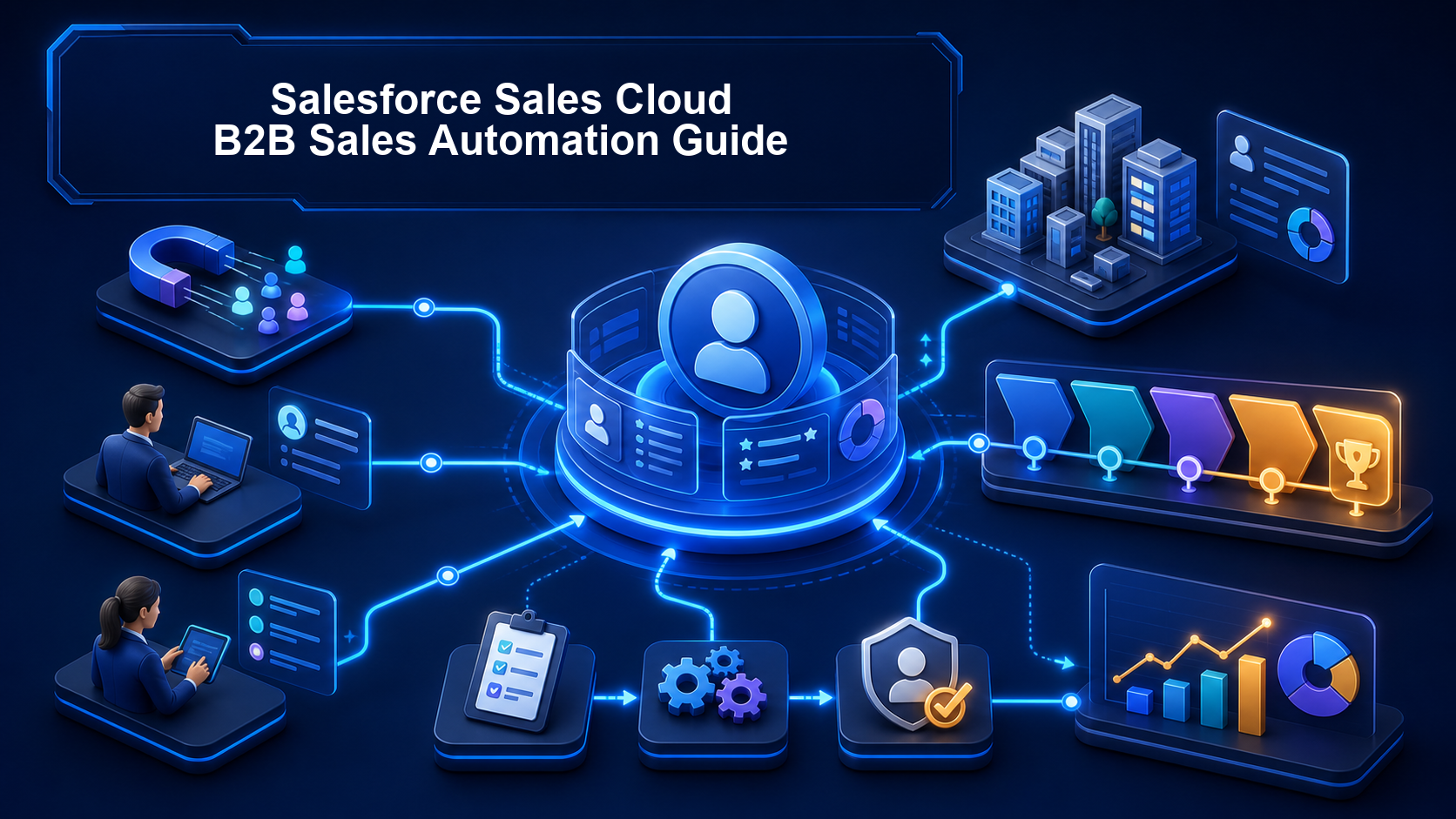
Salesforce Sales Cloud B2B Sales Automation Guide
Customer Relationship Management (CRM), Salesforce
27 August 2026
When inquiries come in through websites, trade shows, email, and sales referrals, teams can easily miss opportunities because of manual assignment, duplicate data, or inconsistent follow-up standards. This article explains how to automate repetitive work—from process mapping and Lead assignment to opportunity stages, Salesforce Flow, and testing metrics—while retaining the human judgment that matters.
1. Key Takeaways
- Before configuring rules for B2B sales automation in Salesforce Sales Cloud, standardize the definitions of Lead, Account, Contact, and Opportunity.
- Lead Assignment Rules, Duplicate Rules, Opportunity Stage, Validation Rules, and Record-Triggered Flow can manage assignment, deduplication, stage controls, and follow-up actions, respectively.
- Automation should not replace sales judgment. High-value opportunities, incomplete data, and exceptions still require review by designated team members.
- After launch, continuously track Lead response time, unassigned Leads, opportunity conversion, time in stage, overdue tasks, and Flow failure logs.
2. Why Shouldn’t You Automate the Entire B2B Sales Process from the Start?
B2B sales cycles are longer and involve multiple decision-makers. If you build extensive rules before standardizing the process, the system will only magnify errors. For example, a “qualified Lead” might mean the Hong Kong team has confirmed the budget, while an overseas team may use the term simply to mean the prospect replied to an email. Applying the same automated conversion rule would distort reporting.
Start by documenting each stage’s entry criteria, owner, required data, permitted exceptions, and completion actions in a process map. Good candidates for automation are tasks with clear rules, high repetition, and verifiable outcomes, such as assigning Leads by region, creating follow-up tasks when deadlines arrive, or checking fields when a stage changes. Decisions involving negotiation, risk assessment, or customer relationships should retain human review.
Consider an industrial equipment exporter that receives website forms, trade show lists, and distributor referrals every day. Marketing distributes them through spreadsheets, sales reps may not know the source, and two reps may pursue the same company. The business should first standardize source, country, product line, and company identifier fields. It can then assign owners, create initial follow-up tasks, and route records that cannot be classified to a queue for manual review.
3. How Should Salesforce Sales Cloud Automation Be Designed?
The core data relationships in Sales Cloud can begin with a Lead. Once qualified, the Lead is converted into an Account, Contact, and Opportunity according to the company’s process. Opportunity Stage represents the opportunity’s current point in the sales cycle, while Sales Path displays stages and guidance for success on the record so teams can work consistently.
The setup can be organized into four layers:

Data Quality
Use Matching Rules to identify potential duplicates, then use Duplicate Rules to warn users or block the record from being saved. Overly strict rules can block legitimate records, so test them with real data samples.

Owner Assignment
Lead Assignment Rules can assign a new Lead to a user or queue based on fields available on that Lead. Classification fields such as region, product, and language should be standardized first.

Stage Controls
Define objective criteria for each Opportunity Stage, then use Validation Rules to prevent opportunities with incomplete data from moving forward—for example, entering the proposal or quote stage without an expected close date.

Flow Actions
Design each Record-Triggered Flow around a trigger, conditions, and actions. For updates to the triggering record only, consider fast field updates. To create related tasks, notifications, or other records, use a path suited to those related actions.
A Salesforce Record-Triggered Flow can also include a Scheduled Path to run a delayed action based on the trigger time or a date field on the record, such as creating a follow-up task two business days later. Before designing it, decide whether the scheduled action should be canceled, rescheduled, or retained if the conditions or date change, so users do not receive duplicate reminders.
4. How Do You Set Up Lead-to-Opportunity Automation?
Start by mapping a minimum viable process. When an inquiry arrives, tag its source and check for duplicates. If it meets routing criteria, assign an owner. If it is not updated within the specified time, create a reminder. Convert it into an Account, Contact, and Opportunity only after a sales rep completes qualification. Then add exception branches for missing data, existing customers, and cross-regional opportunities.
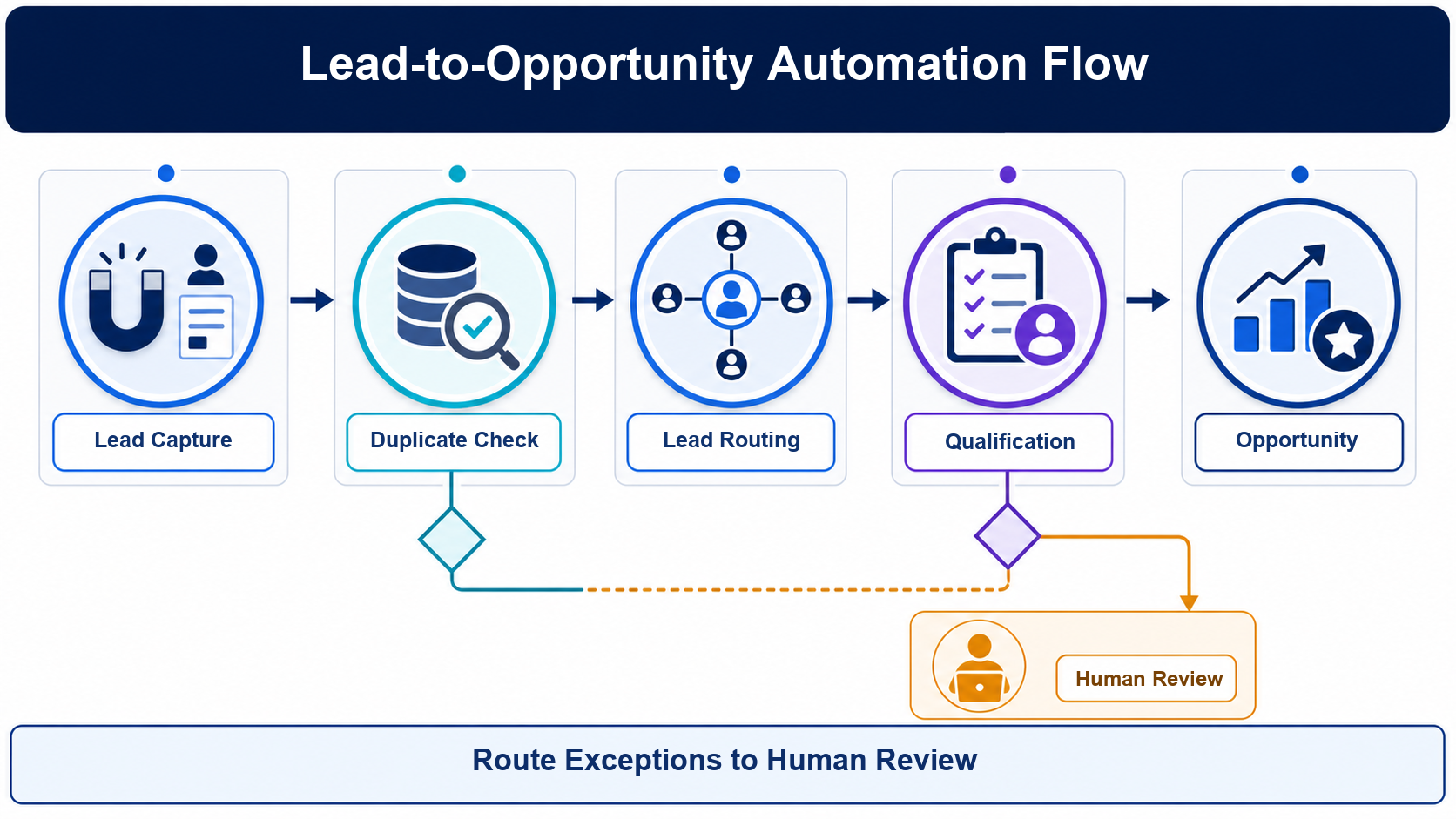
Figure: Conceptual diagram of the primary Lead-to-Opportunity automation path and its exception branches. This is an original AI-generated illustration, not the Salesforce interface.
Lead Assignment Rules work well with Lead fields that are available when the record is created. If routing depends on a Campaign relationship created later, an external score, or cross-object data, use Flow after all required data becomes available or use appropriately evaluated programmatic logic. Do not assume assignment rules can read a relationship that does not yet exist.
Opportunity automation should avoid running every action whenever the stage changes. A Flow can run only when a record first meets the criteria, reducing the chance that routine edits will recreate tasks or notifications. Every automation needs a clear name, description, version, and owner. The more automation an object has, the more important it becomes to consolidate entry points and execution order.
5. Seven Steps to Implement B2B Sales Automation in Salesforce Sales Cloud
Assess the Current Process
List Lead sources, assignment methods, qualification criteria, Opportunity stages, handoff points, and common exceptions.
Standardize the Data Model
Review standard and custom fields, then standardize options for country, product line, source, and loss reason.
Create Quality Gates
Configure Matching Rules, Duplicate Rules, and necessary Validation Rules, deciding when to warn users and when to block an action.
Implement Routing First
Use Assignment Rules or Flow to assign owners and queues, and give records that cannot be classified a clear route to manual review.
Add Follow-Up Actions
Create tasks or a Scheduled Path based on sales deadlines. Every notification should have a recipient, a required action, and a stop condition.
Test in a Sandbox
Cover standard, boundary, duplicate, incomplete, bulk import, API write, and user permission scenarios.
Roll Out in Phases
Start with one market or product line, review failure logs and user feedback, and then expand the rollout.
6. How Do You Test, Govern, and Measure Automation?
Before launch, create a test matrix that records at least the input conditions, expected owner, expected task, whether saving should be allowed, actual outcome, and recovery method. For bulk imports and integrations in particular, confirm that rules run correctly, duplicate tasks are not created, and errors can be routed back to the designated person.
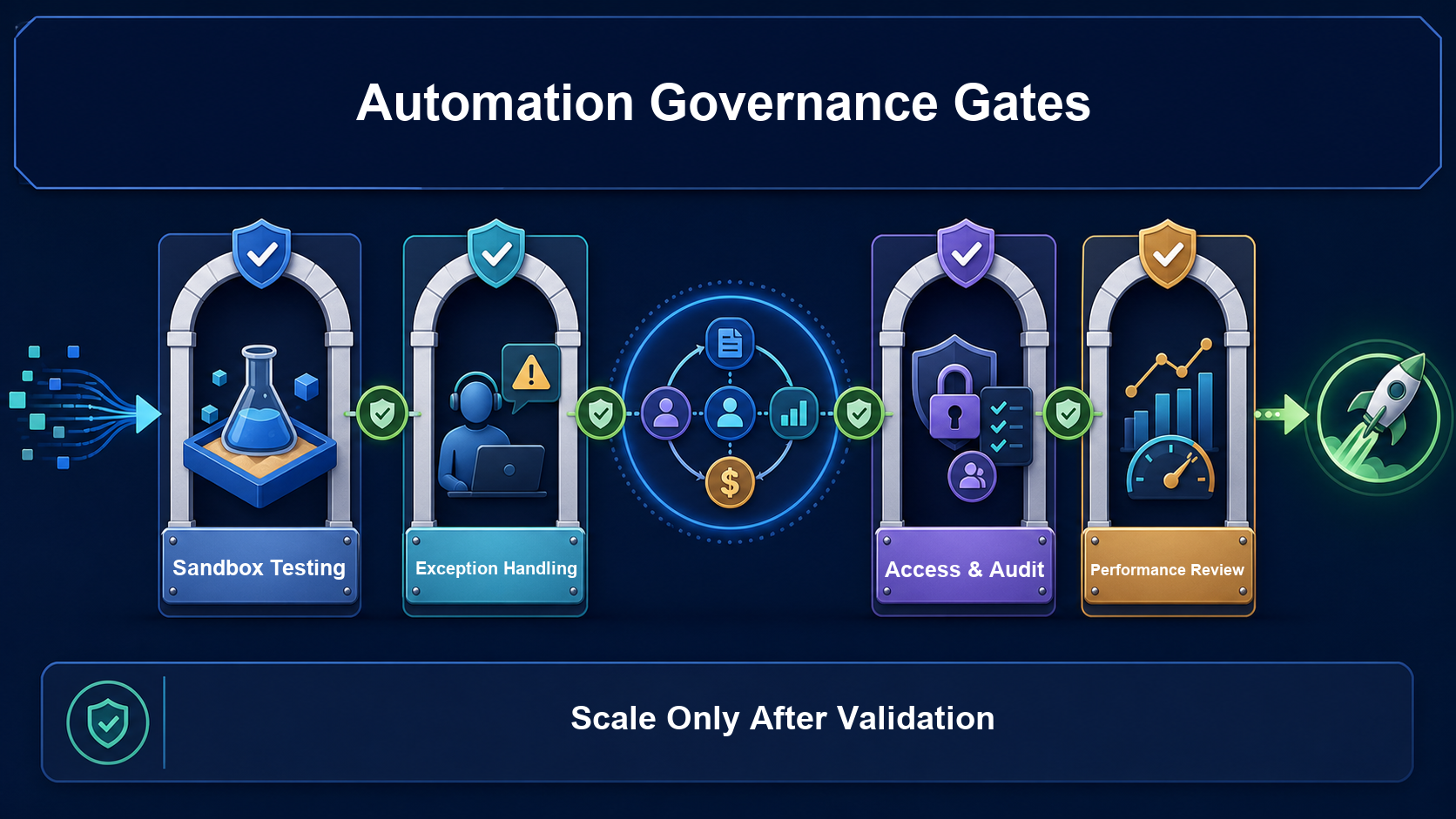
Figure: Governance gates for Sandbox testing, manual exception handling, permissions and auditing, and performance reviews. This is an original AI-generated illustration.
Every automation should have both a business owner and a system owner, with its purpose, trigger conditions, dependent fields, exceptions, deactivation procedure, and last review date documented. Flow is often the first choice for less complex automation. If the same object already has extensive interdependent automation, high transaction volumes, or complex error handling, architecture and development teams should evaluate how to divide responsibilities among Flow, Invocable Apex, and Apex Trigger.
Success should not be measured by the number of rules created. Build a weekly or monthly dashboard to track:
- Time to first response for Leads and the percentage that miss the deadline
- The number of unassigned Leads and how long they remain unassigned
- Duplicate Lead warnings, blocks, and final merges
- Lead-to-Opportunity conversion rates and differences by source
- Time in Opportunity stages, overdue tasks, and completeness of loss reasons
- Flow failures, manually handled exceptions, and duplicate notifications
If response times improve while incorrect assignments increase, greater speed has not improved the process. Teams should evaluate efficiency, data quality, conversion outcomes, and user adoption together before adjusting the conditions.
7. Frequently Asked Questions (FAQ)
Where Should You Start with B2B Sales Automation in Salesforce Sales Cloud?
Start with process and data definitions, not by immediately building a Flow. Choose a high-volume, measurable process segment with clear rules, such as new Lead assignment and initial follow-up. Validate it on a limited scale before expanding.
What Is the Difference Between Lead Assignment Rules and Flow?
Assignment Rules are suited to assigning users or queues based on fields available when a Lead is created. Flow is better for multistep logic, cross-record actions, or processes whose data becomes available later. They can work together, but ownership of owner changes must be clearly defined.
Can Every Qualified Lead Be Converted into an Opportunity Automatically?
You can build an automated action, but relying on a single score or form response is not recommended. Define qualification gates and retain human confirmation for high-value opportunities, existing customers, data conflicts, and cross-regional situations.
When Is a Scheduled Path Appropriate for Follow-Up?
It is appropriate for running a one-time follow-up action at a specified time based on a triggering event or record date, such as creating a task when it becomes due. Test date changes, conditions that stop being true, Flow version changes, and owner deactivation.
How Can You Keep Salesforce Flow Maintainable as It Grows?
Control automation entry points for each object, and use consistent naming, descriptions, versions, owners, and exception handling. As dependencies and transaction volumes increase, conduct an architecture review instead of continuing to stack independent Flows.
8. Conclusion
The value of B2B sales process automation in Salesforce Sales Cloud is not handing every sales decision to the system. It is making data collection, assignment, reminders, and stage controls consistent and traceable. The most practical next step is to select a high-frequency process, define its inputs, exceptions, and KPIs, validate it in a Sandbox, and roll it out incrementally.
To assess your current CRM processes, plan a data model, and integrate automation, explore the Salesforce Sales Cloud solution or contact the LeadsTech team through Contact Us.


9. Further Reading
- Salesforce Sales Cloud: A Complete Guide to CRM Sales Management
Learn more about the foundations of sales data and opportunity management in Sales Cloud. - CRM for Global B2B Companies: A Salesforce Implementation Guide
For companies that need to plan CRM architecture and implementation sequencing across markets. - Why CRM Implementations Fail and How to Choose the Right Consultant
Review common implementation risks involving processes, adoption, and consultant capabilities. - B2B Lead Generation Solutions: Customer Acquisition Through Data and Automation
Connect front-end customer acquisition, data quality, and downstream automation management.
Related Articles

Enterprise AI MarTech Trends Analysis 2024-2029 Outlook Report
From AI content productivity tools to a core engine for revenue growth and marketing transformation
*The PDF will be sent directly to your inbox.

