
CDP + CRM Data Integration Architecture
Customer Relationship Management (CRM), Salesforce
4 September 2026
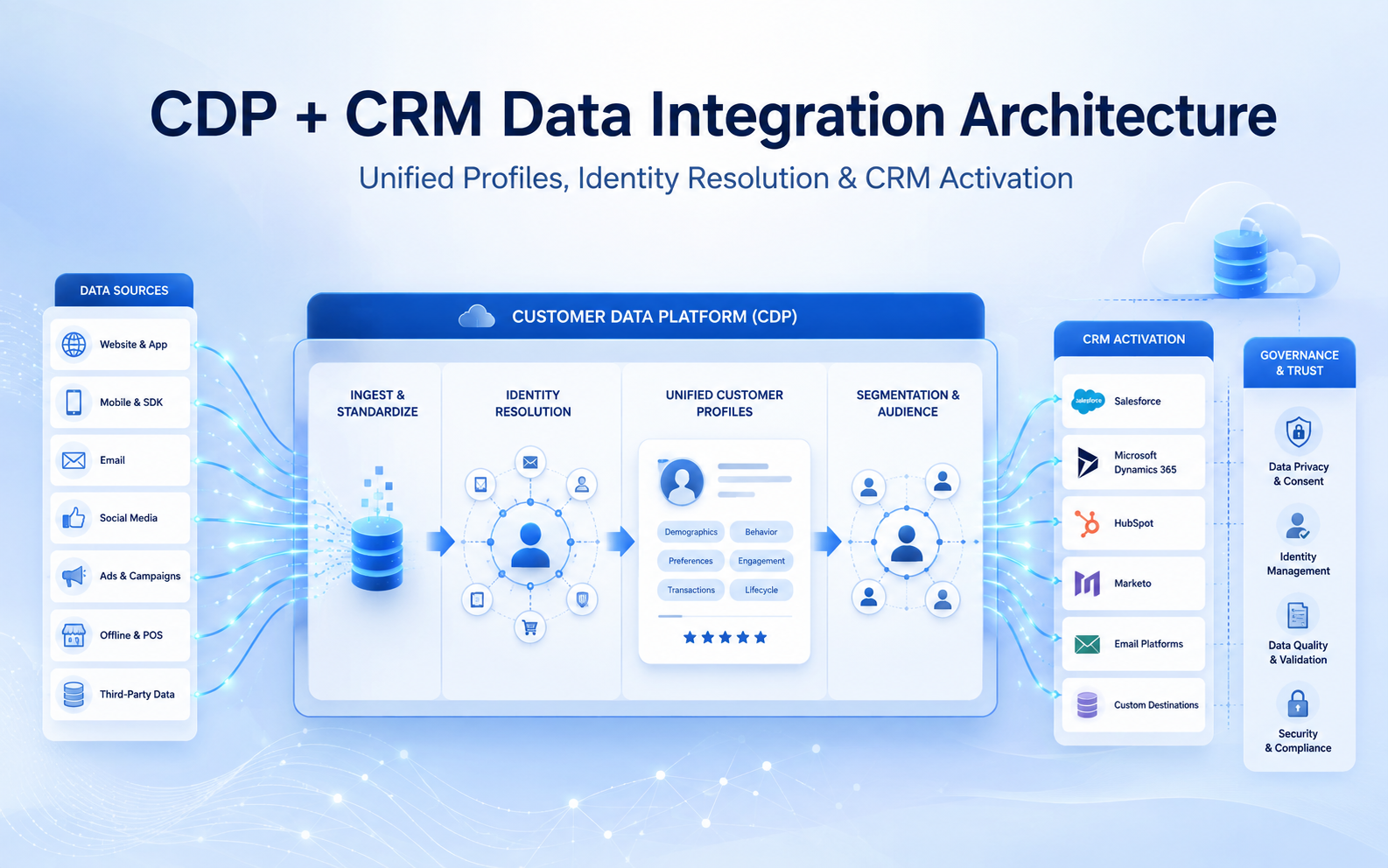
Many companies have customer and opportunity data in CRM, while website, app, ecommerce, service, and marketing interactions remain scattered across other platforms. The same person can appear under multiple identities, leaving frontline teams with incomplete records. A CDP + CRM data integration architecture connects identities, unifies analysis, and brings actionable insight back into business processes while keeping system responsibilities clear. At LeadsTech, we first clarify the source ownership, update responsibility, and intended use of each data element before designing identity resolution and activation. That prevents a unified profile from becoming another difficult-to-maintain data silo.
1. Key Takeaways (TL;DR)
- CRM supports operational sales and service records, while CDP collects, standardizes, resolves identities across sources, segments, and activates data. They complement rather than replace one another.
- The architecture should clearly separate source, ingestion, data model, identity resolution, unified profile, and activation layers.
- A unified profile is a reference view that connects source records; it does not require overwriting data in every source system.
- Measure integration through data freshness, identity matching, consent controls, activation success, and actual business use.
2. What roles do CDP and CRM play in the architecture?
CRM is the system of engagement for sales, service, and customer-success teams. It holds operational data for Accounts, Contacts, Leads, Opportunities, Cases, activities, and owners. CDP brings together known and anonymous data, maps different formats to a shared model, resolves identities, calculates insights, creates audiences, and activates them across marketing, websites, advertising, analytics, or CRM.
The boundary between the two should be defined by use case. For example, CRM or ERP may own a customer’s official contract status, while a digital platform produces website browsing and app behavior. A CDP can connect these signals in a unified profile, but should not overwrite authoritative master data without clear rules. For every important field, define the source system, data owner, update direction, frequency, and conflict-resolution logic.
3. What layers make up a CDP + CRM data integration architecture?
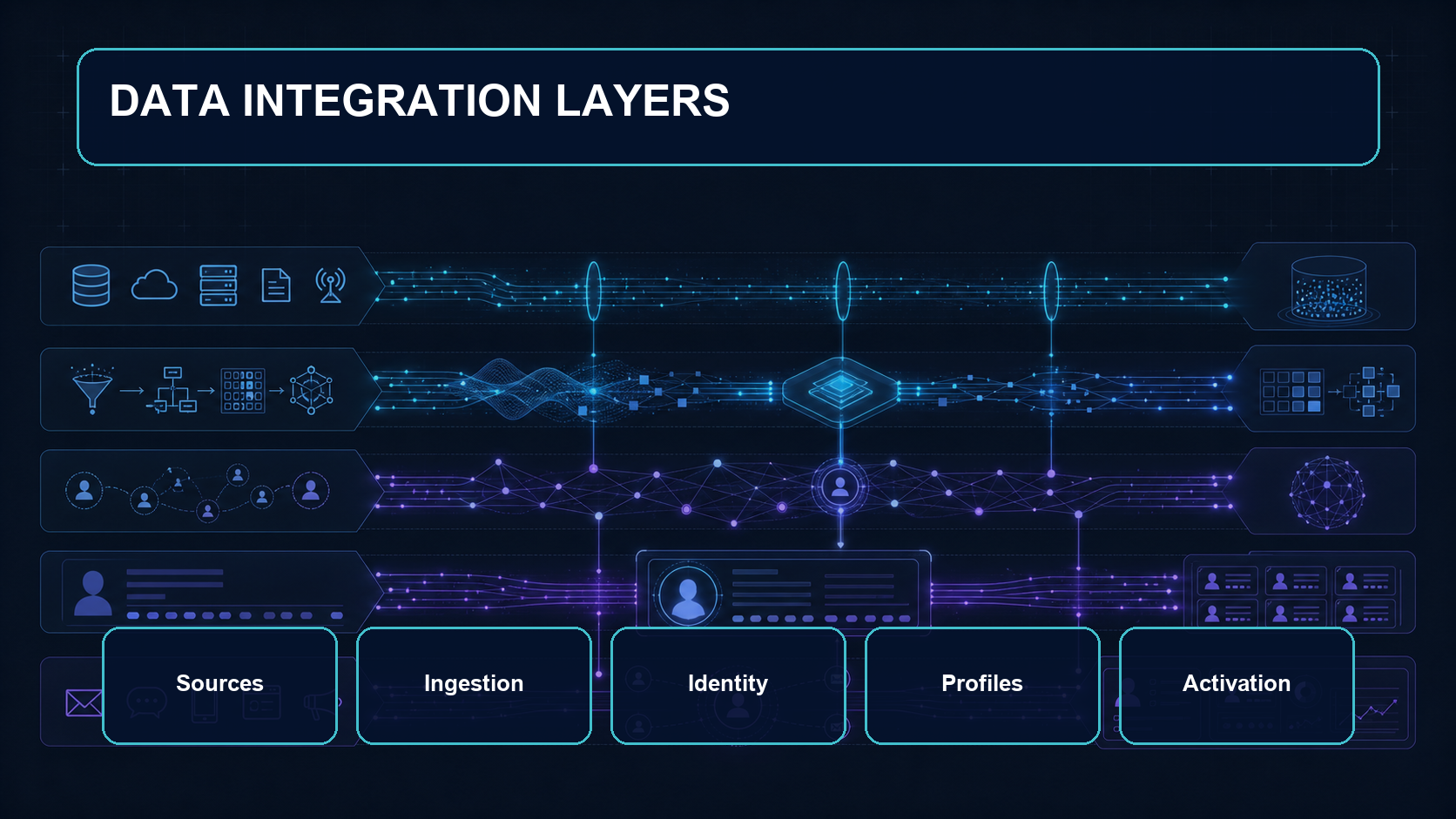
The architecture can be organized into five layers: Sources, Ingestion, Identity, Profiles, and Activation. This layering helps teams settle data responsibilities before choosing connectors, APIs, batch, or streaming technologies, instead of working backward from tools.
1. Sources and Ingestion
Start with a data catalog covering the objects, fields, identifiers, volumes, refresh frequency, and sensitivity level across CRM, ERP, websites, apps, POS, call centers, loyalty platforms, and marketing systems. Bring only the fields required for defined use cases into the first phase to reduce cost and governance complexity.
2. Mapping and a Standard Data Model
Names, phone numbers, addresses, products, consent, and transactions can be defined differently across sources. Normalize and map data to a shared model first. Incorrect types, time zones, codes, or required-field mappings directly affect identity matching and audience accuracy.
3. Identity, Insights, and Activation
Identity Resolution uses match rules to connect source records that may belong to the same person or company, then selects display values based on reconciliation logic or use case. Only then can teams calculate value, recent interactions, preferences, or eligibility and send segments, insights, or data actions downstream.
4. How should identity resolution and data ownership be designed?
Start identity rules with high-confidence identifiers, such as login IDs, membership numbers, or verified email addresses. Add standardized phone, name, and address data only where needed. Rules that are too loose can merge two people incorrectly; rules that are too strict can fail to connect the same customer. Test real samples and measure false positives, false negatives, merge rates, and unmatched reasons.
A unified profile is not a permanent golden record that fuses every source into one row. A more practical approach keeps the key for each source record and chooses trusted data according to purpose. For example, service teams may use a confirmed contact number in CRM, while marketing uses the latest valid consent to decide whether outreach is permitted. Any writeback needs a defined direction, field, trigger, audit trail, and recovery method.
5. How can unified profiles be activated in CRM?
Before activation, ask what action CRM users need to take instead of placing every CDP field on a page. Customer segments, value tiers, recent meaningful interactions, next-best-action guidance, or high-intent signals can appear near Contacts, Leads, Accounts, or Cases, with a clear refresh time and explanation. If an insight cannot change prioritization, response, or service decisions, it may not be worth writing back.
Consider a cross-border retailer whose ecommerce, store-membership, and customer-service data are separate. The CDP uses membership number, verified email, and phone to resolve identity, then calculates recent purchases and service risk. CRM receives only the membership tier, recent-order summary, and follow-up flag that service staff need, without overwriting transactional master data. The team tracks identity-match rate, data latency, service adoption, transfer count, and resolution time to confirm the integration is improving work.
6. CDP + CRM Integration Checklist
- Are the use case, users, trigger actions, and success metrics clear?
- Is there a catalog for every source, field, identifier, data owner, and sensitivity level?
- Are the system of record, update direction, frequency, and conflict rules defined?
- Have data mappings, types, time zones, codes, and required fields been validated with samples?
- Do match rules measure the risk of incorrect merges and missed matches?
- Can consent, purpose, retention, and data access be enforced and audited?
- Does activation send only fields and signals that business teams will actually use?
- Are integration errors, latency, cost, and data quality monitored with clear owners?
7. How should data integration success be measured?
At the technical level, track data-flow success rate, latency, field completeness, duplication rate, identity-match rate, sampled incorrect merges, and activation success rate. At the operating level, examine whether CRM users view and act on insights, lead routing becomes more accurate, service teams switch systems less often, and campaign, opportunity, or case workflows become shorter. The number of profiles without downstream action should not be treated as success on its own.
8. Frequently Asked Questions (FAQ)
We already have CRM. Why do we still need a CDP?
A CDP adds value when customer behavior lives outside CRM, anonymous and known identities must be connected, teams need cross-channel segmentation, or activation must be near real time. With few sources and simple use cases, it may not be necessary.
Can a CDP replace CRM?
Usually not. CDP focuses on unifying, analyzing, and activating data, while CRM manages sales and service processes, owners, and interaction records.
Does integration have to be real time?
Not always. Personalization while a customer is browsing may need real time, while daily reporting or low-frequency follow-up can run in batches. The right frequency depends on business urgency and cost.
How can Identity Resolution avoid incorrect merges?
Start with reliable identifiers and strict rules, test with real samples, then add fuzzy matching gradually. Keep source keys, audit results, and a process for splitting records.
What data belongs back in CRM?
Write back insights that can change sales or service actions, are clearly defined, and have controlled refreshes. High-volume event detail usually belongs in CDP or analytics, with summaries provided to CRM.
9. Conclusion
The core of CDP + CRM data integration architecture is keeping data responsibility in the right systems while giving teams a useful unified customer reference. Start with a small number of high-value use cases, validate identity, consent, data quality, and downstream actions, then expand sources and activation. To plan Customer 360, identity rules, or CRM activation workflows, contact us or explore LeadsTech’s Salesforce Data Cloud solution.


10. Further Reading
- CRM vs CDP: How Should Enterprises Choose a Customer Data Platform?
Understand the positioning and selection criteria for the two platforms. - What Is a Customer Data Platform (CDP)? Value and Applications
Learn about the core capabilities and business use cases of CDP. - CDP vs CRM: Differences and Use Cases Explained
Compare data and process responsibilities through practical scenarios. - DXP vs CMS vs CDP: A Complete Comparison of Enterprise Digital Experience Architecture
See how CDP fits into a more complete digital experience architecture.
Related Articles

Enterprise AI MarTech Trends Analysis 2024-2029 Outlook Report
From AI content productivity tools to a core engine for revenue growth and marketing transformation
*The PDF will be sent directly to your inbox.

