
Multilingual DAM Guide: Manage Product Content Across Languages
AEM Asset, Content Management System (CMS), Digital Asset Management (DAM), Translation Management System (TMS)
20 July 2026
- Introduction: Why Product Content Becomes Harder to Manage
- Build a “Master Asset + Language Versions” Model
- Use Metadata Instead of Guessing from Folder Structures
- Bring Translation, Approval, and Publishing into One Workflow
- Connect Websites, E-commerce, and Sales Content
- A Three-Phase Implementation Approach
- Common Pitfalls and Recommendations
- Frequently Asked Questions (FAQ)
- Conclusion
- Further Reading
- Introduction: Why Product Content Becomes Harder to Manage
- Build a “Master Asset + Language Versions” Model
- Use Metadata Instead of Guessing from Folder Structures
- Bring Translation, Approval, and Publishing into One Workflow
- Connect Websites, E-commerce, and Sales Content
- A Three-Phase Implementation Approach
- Common Pitfalls and Recommendations
- Frequently Asked Questions (FAQ)
- Conclusion
- Further Reading
Summary
When multilingual product materials are scattered across cloud drives, emails, e-commerce platforms, and regional team computers, businesses can easily encounter issues such as outdated files being used, translations falling out of sync, and duplicate asset creation. Multilingual digital asset management is not simply about building a file repository. Its core purpose is to create a unified and traceable system that connects product digital assets, language versions, approval statuses, and publishing channels.
1. Introduction: Why Product Content Becomes Harder to Manage—the Challenge of Multilingual Digital Asset Management
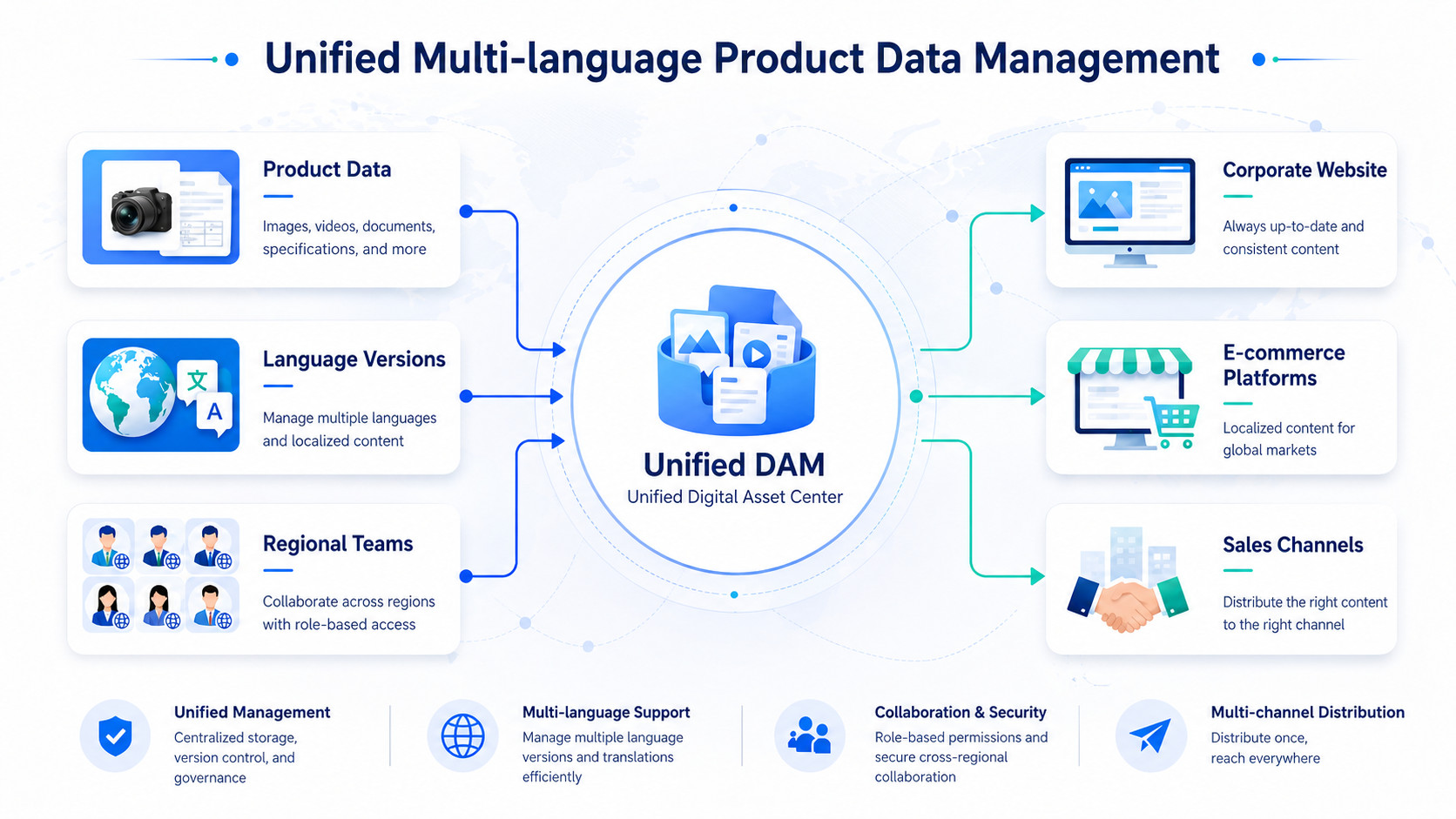
Product content often becomes disorganized not because there are too many files, but because no one can clearly tell which asset is the master version, which market it is intended for, or whether it has been approved for distribution. For example, an English specification sheet may be updated while the German, French, and Japanese versions remain unchanged; an overseas sales team may continue using an outdated packaging image in quotations; and a regional marketing team may create yet another promotional visual independently.
These are precisely the challenges that multilingual digital asset management is designed to solve. Digital Asset Management (DAM) is a system for centrally storing, classifying, governing, finding, and distributing digital assets such as images, videos, and documents. For multilingual export websites, cross-border e-commerce pages, and sales content, language versions should not exist as disconnected file copies. Instead, they should be managed as traceable localized versions linked to the same product asset. Adobe Experience Manager Assets supports multilingual asset workflows for translating asset binaries, metadata, and tags while managing versions across languages.
2. Build a “Master Asset + Language Versions” Model
Effective multilingual digital asset management begins by defining clear relationships between assets—not by creating a maze of country-specific folders.
A three-tier model is recommended:
Tier 1: Global Master Assets
Headquarters maintains master product images, core videos, product catalogs, specification sheets, and brand templates. These master assets establish the authoritative product facts, brand standards, and core visuals, and regional teams should not overwrite them directly.
Tier 2: Language Versions
Localized copy, subtitles, manuals, packaging artwork, and market-specific compliance information are managed as derivatives of the master assets. For example, an English product brochure may have German, French, Spanish, and Arabic versions.
Tier 3: Regional Marketing Versions
This tier covers campaign posters, social media assets, channel-specific visuals, and local market case studies. Regional teams retain the flexibility to localize content, but every derivative must remain linked to the relevant master product asset and brand standards.
With this model in place, multilingual digital asset management is no longer about storing a separate set of files for every country. Instead, teams can clearly distinguish what may be localized from what must remain under centralized control.
3. Use Metadata Instead of Guessing from Folder Structures
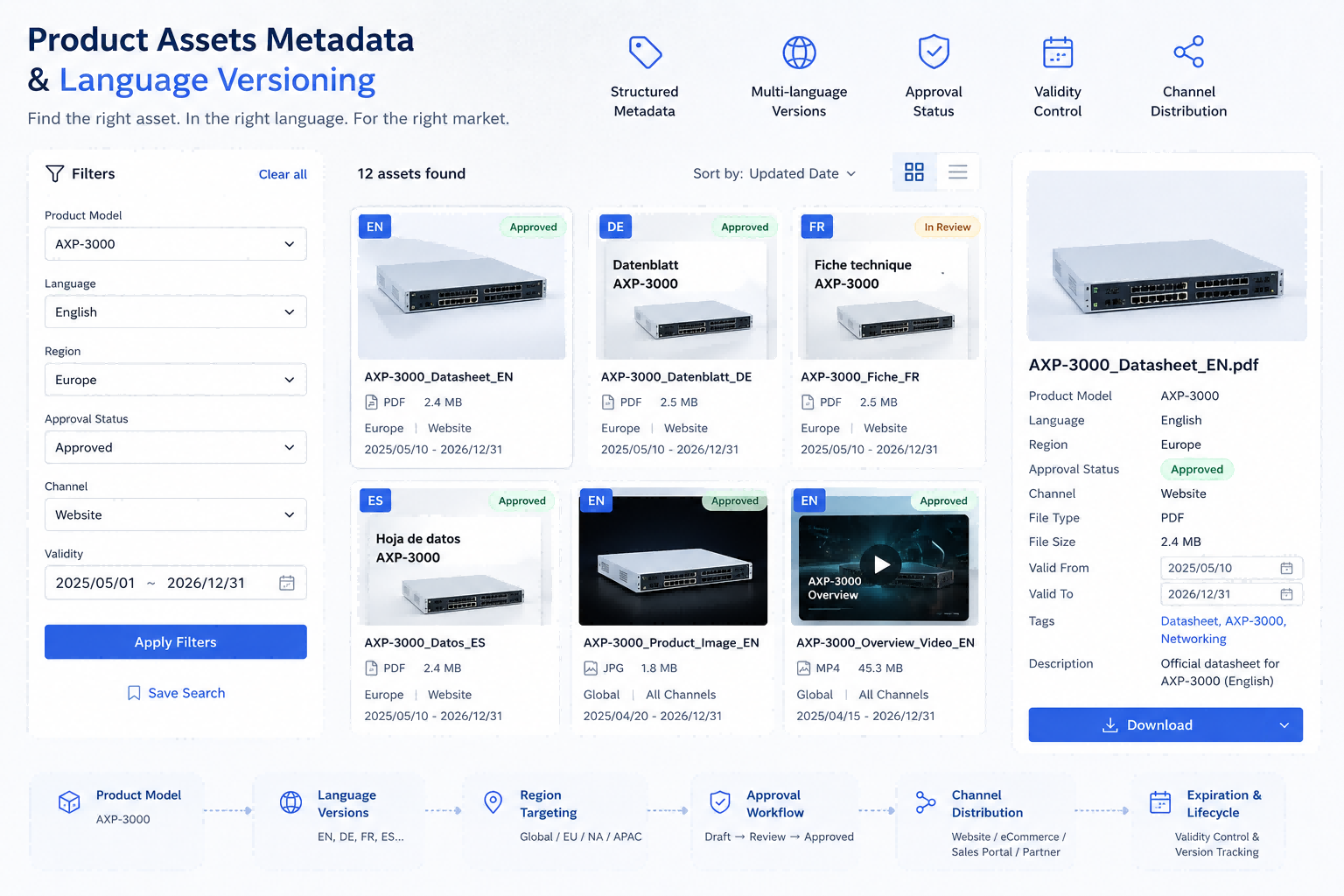
A folder can tell you where a file is stored, but rarely whether it is fit for use. Multilingual digital asset management therefore requires a consistent metadata framework.
At a minimum, each asset should include the following fields:
- Product line and model
- Source language and target language
- Applicable country or region
- Intended channels, such as websites, e-commerce, social media, and sales content
- Approval status, such as draft, pending review, approved, or expired
- Version number, validity period, and copyright information
Metadata Profiles in Adobe Experience Manager Assets can automatically apply default metadata to assets subsequently uploaded to designated folders. Folder structures can also work alongside metadata, tags, and taxonomies to improve asset search and discovery, while access should be governed through dedicated user, group, and permission settings.
For teams, this means no longer relying on filenames such as “final_v8_new_latest” to determine which file is correct. Instead, they can use filters to quickly locate the right asset—for example, an approved German-language version for the German market and corporate website.
4. Bring Translation, Approval, and Publishing into One Workflow
Translating product content does not end when files are handed over to a translation provider. The greatest risks often arise after translation: Who validates terminology? Who reviews regulatory requirements? Who authorizes distribution? Has the previous version been retired?
Multilingual digital asset management should therefore break the process into clear, actionable stages:
- Headquarters uploads or updates the master asset.
- The system creates tasks for the target languages.
- The translation team localizes copy, tags, subtitles, or supporting documentation.
- The regional marketing team reviews language quality and local market fit.
- Brand, product, or legal stakeholders provide final approval.
- Only approved assets may be distributed to websites, e-commerce platforms, or sales channels.
AEM’s translation integration framework can connect to configured third-party translation services, manage pages and assets through translation projects, and support both human and machine translation workflows.
This mechanism prevents translated content from going live before approval and ensures that every language version has a clearly assigned owner and status record.
5. Connect Websites, E-commerce, and Sales Content
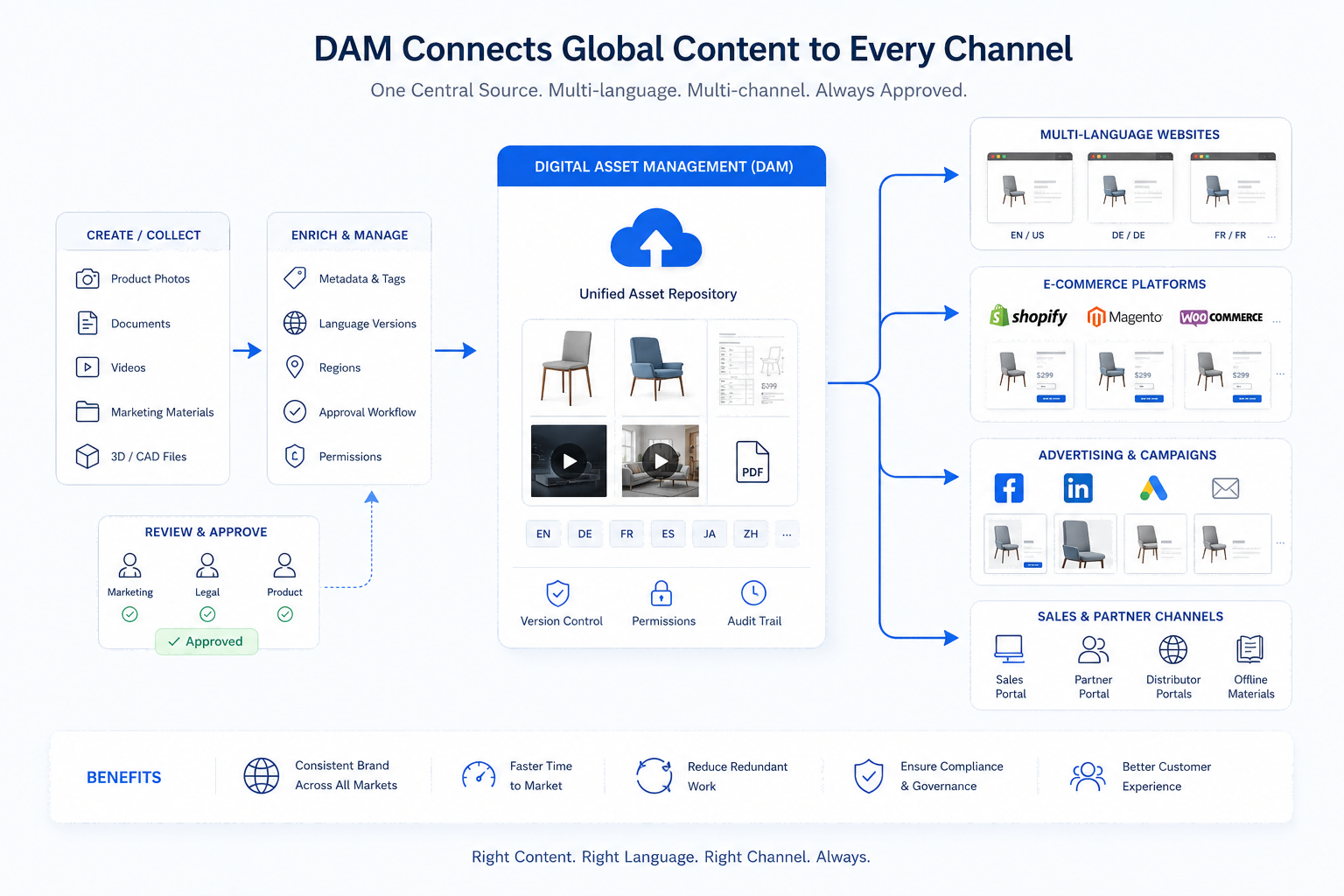
For multilingual export websites, DAM should be more than a marketing asset library. It should serve as the single source for approved product digital assets. Corporate websites need product images, customer-story videos, and downloadable resources; e-commerce platforms need hero images, detail shots, and product instructions; sales teams need regional catalogs, quotation attachments, and presentation materials. Structured master data such as product pricing, inventory, and specification fields should generally remain managed in PIM, ERP, or e-commerce platforms.
The key to multilingual digital asset management is enabling every channel to use the same approved content rather than maintaining separate copies. Adobe positions Experience Manager Assets as a platform for centrally organizing, classifying, and reusing assets, with configurable metadata and governance capabilities that help teams find and use the right content.
This is also an often-overlooked aspect of long-term multilingual website operations. When a website language version is updated, teams should also review e-commerce product pages, PDF catalogs, sales materials, and social media visuals. Otherwise, customers may encounter conflicting information across channels.
6. A Three-Phase Implementation Approach
Implementing multilingual digital asset management does not require organizing every historical file at once. A more practical approach is to begin with frequently used content that directly affects the customer experience.

Phase 1: Organize Core Product Assets
Prioritize master product images, specification sheets, product videos, brand logos, sales catalogs, and frequently used website assets. Establish basic metadata for language, region, and approval status.

Phase 2: Establish Translation and Approval Workflows
Define who maintains master assets, who handles translation, who conducts regional review, and who has final publishing authority. This is one of the most important governance priorities in a multilingual DAM implementation.

Phase 3: Connect Business Channels
Gradually connect DAM with corporate websites, cross-border e-commerce, sales portals, marketing automation, or PIM so that approved content becomes part of day-to-day business workflows.
Across these three phases, multilingual digital asset management evolves from a one-off file organization project into a sustainable content operations framework.
7. Common Pitfalls and Recommendations
Organizations typically encounter three common pitfalls during implementation:
Duplicating Every Folder by Country
As more copies accumulate, it becomes increasingly difficult to identify the authoritative master version.
Managing Images but Not Documents or Videos
Specification sheets, certifications, installation videos, and sales presentations are equally important digital assets.
Lacking Expiration and Replacement Controls
When products, packaging, or regulations change, outdated versions may still remain available for download and use.
High-quality multilingual digital asset management should make the latest version in the correct language, for the correct market and channel, the default outcome—not something employees must verify from memory and manual checks.
8. Frequently Asked Questions (FAQ)
How Is Multilingual DAM Different from a Standard Shared Drive?
A standard shared drive primarily supports file storage and sharing. Multilingual DAM also uses metadata, version relationships, approval status, permissions, and channel distribution controls to help teams identify and use approved assets for the correct language and market.
What Do DAM, PIM, CMS, and TMS Each Manage?
DAM manages digital assets such as images, videos, and documents. PIM manages structured product information such as specifications and pricing. CMS manages website pages and content publishing. TMS manages translation tasks, terminology, and language workflows. Organizations typically integrate these systems so they work together rather than expecting one to replace the others.
Should an Organization Organize All Historical Assets Before Importing Them into DAM?
Not necessarily. A more manageable approach is to pilot the program with frequently used, high-risk, or customer-facing core assets, then gradually expand to other product lines and regions.
Can AEM Assets Complete Every Translation Automatically?
No. It should not be assumed that AEM Assets automatically completes every translation out of the box. AEM can connect to third-party human or machine translation services through its translation integration framework and manage tasks through translation projects and workflows. Results still depend on connector configuration, translation rules, terminology management, and human review.
9. Conclusion
Once an organization expands into multiple overseas markets, disorganized product content is no longer a minor file-management issue. It directly affects brand consistency, sales efficiency, and customer experience. By managing master assets, linking language versions, applying metadata standards, enforcing approval workflows, and coordinating channel distribution, organizations can help teams in every market access the right content faster.
Multilingual digital asset management helps multilingual export websites, cross-border e-commerce operations, and international sales teams reduce duplicated effort while keeping product content consistent, traceable, and continuously maintainable across global markets.
If you are planning a multilingual DAM initiative or considering Adobe Experience Manager Assets as the foundation for a centralized product digital asset hub, visit LeadsTech’s Digital Asset Management services page to learn how we help organizations unify product assets, manage language versions, establish approval workflows, and distribute content consistently across channels.
Explore Our DAM Implementation Services
Every organization approaches multilingual DAM with a different volume of assets, number of languages, internal processes, technology architecture, and channel requirements. If you would like to assess whether Adobe Experience Manager Assets fits your business needs, or develop a practical multilingual DAM implementation roadmap, contact the LeadsTech consulting team to discuss your digital asset management, language-version governance, and system integration requirements.

10. Further Reading
- What Is Digital Asset Management (DAM)? A 5-Minute Guide to Why Organizations Need It
A useful introduction to DAM fundamentals and how DAM reduces asset fragmentation and version confusion. - How Should Different Organizations Choose the Right Digital Asset Management (DAM) System?
A practical guide to evaluating organizational scale, asset volume, collaboration complexity, and DAM platform options. - Five Localization Strategies for Multilingual Corporate Websites and a Guide to CMS Selection
Further guidance on long-term multilingual website operations and content localization.

