
Adobe Analytics vs. GA4: Choosing Enterprise Web Analytics and MarTech
Adobe Analytics, Adobe Customer Journey Analytics, Adobe Experience Cloud, Google Analytics, MarTech, Website Analytics
21 July 2026
- Key Takeaways
- What Are Adobe Analytics and GA4?
- Adobe Analytics vs GA4: Key Differences
- Which Businesses Is GA4 Best Suited For?
- Which Businesses Is Adobe Analytics Best Suited For?
- When Should You Consider CJA?
- Can Businesses Use Adobe Analytics and GA4 Together?
- Recommended Steps for Implementing a Web Analytics Platform
- Frequently Asked Questions
- Conclusion
- Further Reading
- Key Takeaways
- What Are Adobe Analytics and GA4?
- Adobe Analytics vs GA4: Key Differences
- Which Businesses Is GA4 Best Suited For?
- Which Businesses Is Adobe Analytics Best Suited For?
- When Should You Consider CJA?
- Can Businesses Use Adobe Analytics and GA4 Together?
- Recommended Steps for Implementing a Web Analytics Platform
- Frequently Asked Questions
- Conclusion
- Further Reading
1. Key Takeaways
- GA4 is well suited to businesses that want to quickly establish foundational web and app analytics, track Google Ads performance and conversion events, and export data to BigQuery.
- Adobe Analytics is ideal for medium-sized and large enterprises with complex digital channel behaviour that require custom dimensions and metrics, advanced segmentation, attribution model comparisons, and cross-departmental reporting governance.
- Platform selection should not be reduced to “GA4 for small and medium-sized businesses, Adobe Analytics for large enterprises.” The decision should instead reflect analytics requirements, data governance, team capabilities, and the broader MarTech architecture.
- For businesses already using AEM, Adobe Target, Adobe Commerce, CJA, or RTCDP, Adobe Analytics can usually integrate more seamlessly into an Adobe Experience Cloud analytics and optimisation workflow.
- Whichever platform you choose, a clear measurement strategy, a reliable Data Layer, consistent event-naming conventions, and robust data governance matter more than simply installing the tool.
- When comparing GA4 with Adobe Analytics, businesses should first clarify data governance, customer journeys, and MarTech integration; LeadsTech’s web and customer journey analytics service can help translate those business questions into a measurement framework and optimisation priorities.
2. What Are Adobe Analytics and GA4?
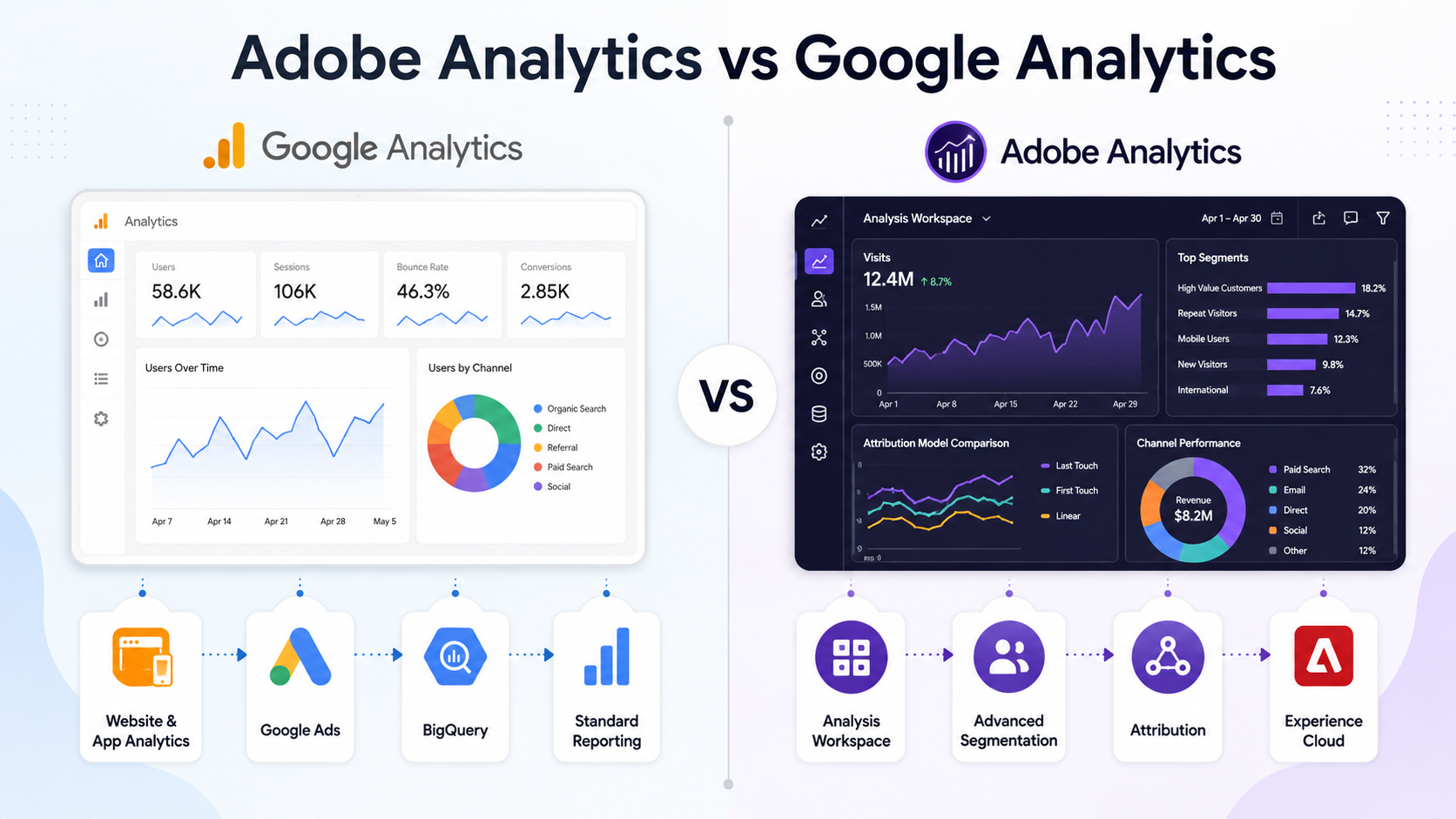
GA4 is Google’s web and app analytics platform. Its defining feature is an event-based approach to data collection. Interactions such as page views, button clicks, form submissions, video plays, adding items to a shopping cart, and completed transactions can all be recorded as events. Businesses can use GA4 to understand traffic sources, user behaviour, conversion journeys, and campaign performance, while integrating it with tools such as Google Ads, BigQuery, and Looker Studio.
Adobe Analytics is Adobe Experience Cloud’s enterprise digital analytics platform. It is primarily used to analyse interactions across websites, apps, products, and digital marketing channels. Analysis Workspace provides a highly flexible analytics environment in which analysts can combine dimensions, metrics, segments, and attribution models to explore user behaviour and the factors driving conversions in depth.
In simple terms, GA4 focuses on quickly establishing standardised web and app analytics and integrating them with Google’s marketing ecosystem. Adobe Analytics focuses on enterprise-grade custom analytics, variable governance, exploratory analysis in Analysis Workspace, and breaking down complex business questions.
3. Adobe Analytics vs GA4: Key Differences
| Comparison Area | GA4 | Adobe Analytics |
|---|---|---|
| Core Positioning | Event-based web and app analytics with integration into Google’s marketing ecosystem | Enterprise digital behaviour analytics and custom reporting governance |
| Data Model | Event-based data model | A custom measurement framework built around Report Suites, events, eVars, props, metrics, and more |
| Reporting | Standard reports, Explorations, Looker Studio, and BigQuery | Analysis Workspace, segments, calculated metrics, and attribution panels |
| Advertising Integration | More direct integration with Google Ads and Google Marketing Platform | Better suited to Adobe Experience Cloud and enterprise MarTech architectures |
| Implementation Complexity | Generally lower, although event naming and conversion definitions are still required | Generally higher, requiring measurement design, variable governance, and a reporting architecture |
| Best-Suited Teams | Marketing, content, advertising, and foundational analytics teams | Data analytics, MarTech, and enterprise digital experience teams |
GA4 benefits from widespread adoption, a relatively low barrier to implementation, and convenient integrations with Google Ads, BigQuery, and Looker Studio. Adobe Analytics, by contrast, enables businesses to build analytics models that more closely reflect their operating logic across different brands, markets, products, content, campaigns, and customer segments.
4. Which Businesses Is GA4 Best Suited For?
GA4 is well suited to businesses that need a quick view of website, app, and marketing performance, supported by standardised metrics for day-to-day operations. Common use cases include:
Primarily analysing website traffic, content performance, form submissions, and e-commerce conversions.
Marketing teams that use Google Ads frequently and want to connect advertising performance with website results.
Relatively straightforward website and app data architectures, with analytics focused on common funnels and conversions.
Exporting raw event data to BigQuery for further analysis with BI tools.
However, installing a tracking tag does not mean GA4 will automatically produce reliable insights. Businesses still need to plan event-naming conventions, conversion definitions, cross-domain tracking, Consent Mode, reporting permissions, and data-retention policies. Without this groundwork, different departments may interpret the same metric differently.
5. Which Businesses Is Adobe Analytics Best Suited For?
Adobe Analytics is better suited to businesses with complex digital channel behaviour that require advanced segmentation, custom dimensions, reporting governance, and ongoing exploratory analysis by a dedicated analytics team.
Financial services, retail, telecommunications, media, travel, multinational brands, and enterprise B2B companies, for example, often need to know more than simply how many people converted. They also need to understand how different content, products, devices, channels, markets, and customer segments influence outcomes.
The enterprise value of Adobe Analytics is typically reflected in the following areas:
- Using custom dimensions and metrics to align the analytics framework with actual business processes.
- Applying advanced segmentation to compare customer groups, behavioural paths, and conversion characteristics.
- Building flow, fallout, cohort, attribution, and content-interaction analyses in Analysis Workspace.
- Integrating with Adobe Target, AEM, Adobe Commerce, and other solutions to connect analytics, content management, e-commerce, and personalised experiences.
- Establishing more comprehensive controls for permissions, classifications, naming conventions, event management, and reporting governance.
The decision to adopt Adobe Analytics should nevertheless depend on the organisation’s data architecture, governance capabilities, budget, team maturity, and actual analytics requirements—not simply its size.
6. When Should You Consider CJA?
When comparing Adobe Analytics and GA4, businesses often encounter another question: if they want to analyse the complete customer journey, should they use Adobe Customer Journey Analytics (CJA)?
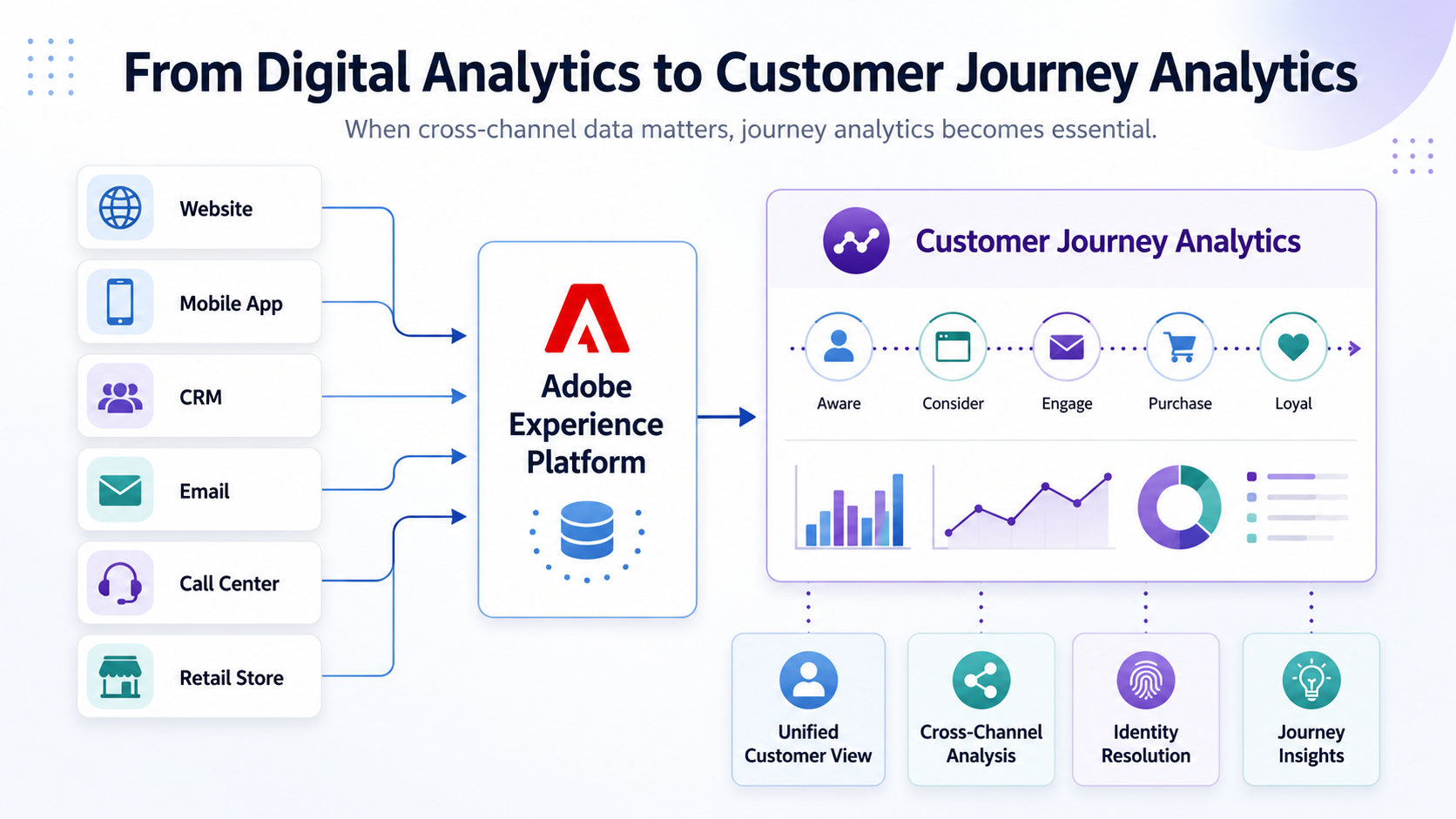
Adobe Analytics primarily handles behavioural analysis across websites, apps, and digital channels. CJA, built on Adobe Experience Platform, supports a wider range of data sources and the XDM data model for cross-channel customer journey analytics.
If a business only needs to analyse website traffic, content interactions, forms, campaigns, product views, or app behaviour, Adobe Analytics can generally support most digital channel analytics requirements. However, if it needs to integrate website, app, CRM, customer service, physical store, email, or other online and offline data—and analyse cross-channel customer journeys through a unified data model—it should also evaluate CJA and an AEP architecture.
7. Can Businesses Use Adobe Analytics and GA4 Together?
Yes. Some businesses use both platforms: marketing teams rely on GA4 for Google Ads, routine traffic analysis, and BigQuery exports, while data teams use Adobe Analytics for in-depth behavioural analysis, enterprise reporting, and Adobe Experience Cloud integration.
Running both platforms in parallel does not mean businesses should create two unrelated sets of measurement rules. They need a shared, clearly defined Data Layer, event names, conversion definitions, and business metrics. They must also account for differences between the platforms in sessions, user identification, attribution models, event triggers, consent management, time zones, bot filtering, and cross-domain tracking.
A dual-platform strategy delivers genuine value only when each platform has a clearly defined role, user base, and decision-making scenario. Otherwise, it may simply increase tag-maintenance, data-reconciliation, and training costs.
8. Recommended Steps for Implementing a Web Analytics Platform
Businesses can follow the process below when implementing Adobe Analytics or GA4:
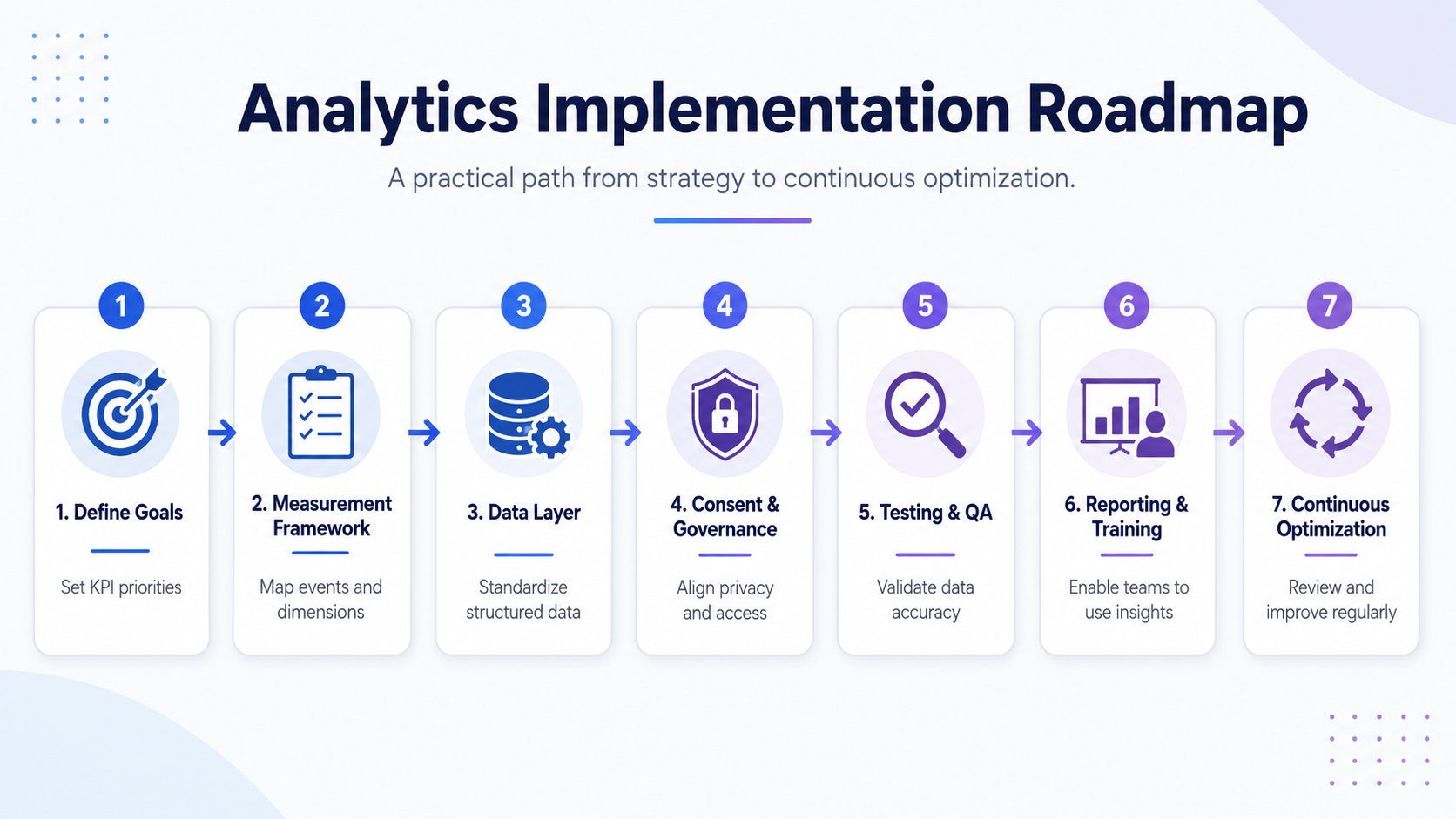
- Define business objectives and KPIs, and identify the questions the organisation expects the analytics platform to answer.
- Build a measurement framework that lists the pages, events, conversions, dimensions, user properties, and data sources to be tracked.
- Design a consistent Data Layer and tagging specification to prevent tracking confusion when tools change or the website is redesigned.
- Configure consent management, data retention, permissions, and rules for handling sensitive data.
- Conduct testing and data validation to confirm that event triggers, field values, conversion settings, and reporting logic are correct.
- Establish reports and analytics workflows, and train teams so that data can effectively support content, marketing, product, e-commerce, and management decisions.
- Review the measurement architecture regularly, removing obsolete events and incorporating new business requirements.
Technology vendors provide analytics platforms and product capabilities. LeadsTech’s role is to help businesses define requirements, plan measurement, implement tags, integrate systems, validate data, and continuously optimise the setup—ensuring that platform configuration aligns with real-world decision-making processes.
9. Frequently Asked Questions
Which is better: Adobe Analytics or GA4?
No single platform is right for every business. GA4 is well suited to standard website and app analytics, Google Ads, and foundational marketing analysis. Adobe Analytics is a stronger fit for organisations that require in-depth segmentation, custom dimensions, complex path analysis, reporting governance, and Adobe Experience Cloud integration.
Can Adobe Analytics replace GA4?
Yes, but businesses should first determine whether their Google Ads and BigQuery integrations, existing reports, conversion definitions, and team workflows need to be redesigned. Changing platforms is not simply a matter of replacing a tracking tag; it requires adjustments to the measurement architecture, data governance, and analytics processes.
What is the difference between Adobe Analytics and CJA?
Adobe Analytics primarily handles behavioural analysis across websites, apps, and digital channels. CJA is built on Adobe Experience Platform and supports a wider range of data sources and the XDM data model for cross-channel customer journey analytics.
What are the most common problems when implementing a web analytics tool?
The most common issues are not missing reports, but inconsistent event naming, unclear metric definitions, inadequate testing, unplanned consent management, and the absence of clear data ownership. These problems prevent teams from trusting or using the analytics results.
10. Conclusion
Choosing between Adobe Analytics and GA4 is ultimately a choice about the organisation’s analytics requirements, data governance capabilities, and MarTech architecture. GA4 helps businesses quickly establish a foundation for web and app analytics while integrating with Google Ads, BigQuery, and Google’s marketing ecosystem. Adobe Analytics offers greater flexibility for complex data, in-depth exploration, Adobe Experience Cloud integration, and enterprise-grade governance.
The factors that truly determine results are a clear measurement strategy, a reliable Data Layer, robust tag implementation, rigorous data validation, and operating processes that turn insights into action.
LeadsTech provides consulting and implementation services for web, app, and customer journey analytics. We help businesses evaluate Google Analytics, Adobe Analytics, and Adobe Customer Journey Analytics, and support measurement planning, tag implementation, data validation, and platform integration.
To learn more about our services, visit:
Explore Our Web, App, and Customer Journey Analytics Services
To discuss analytics platform selection and implementation options for your organisation, contact the LeadsTech consulting team:

11. Further Reading
- Web, App, and Customer Journey Analytics Services
Learn how LeadsTech uses Google Analytics, Adobe Analytics, and Adobe Customer Journey Analytics to build enterprise analytics capabilities. - Adobe Analytics Data Analytics Platform
Learn how Adobe Analytics supports enterprise-grade analytics across websites, apps, and digital channels. - Recommended Adobe Customer Journey Analytics (CJA) Service Providers: How Should Businesses Choose the Right CJA Implementation Consultant?
Learn how businesses can evaluate CJA consultants, AEP data integration, Connections, Data Views, and cross-channel analytics capabilities. - Customer Data Platform (CDP) Implementation and Management
Learn how businesses can integrate customer data from multiple sources to build a Customer 360 for analytics and marketing.
Recommended Articles

Enterprise AI MarTech Trends Analysis 2024-2029 Outlook Report
From AI content productivity tools to a core engine for revenue growth and marketing transformation
*The PDF will be sent directly to your inbox.
Email Error
Please enter a valid email address.
Thank You!
The whitepaper has been sent to your inbox. If you don’t see it, please check your spam or promotions folder.

