
GA4 Guide: Website Analysis and Optimization with Google Analytics
Google Analytics, MarTech, Website Analytics
12 August 2026
- What business questions should GA4 website analysis answer first?
- How should you plan GA4 events and Key event?
- How can GA4 identify traffic, content, and conversion issues?
- How can GA4 become a continuous optimization workflow?
- GA4 implementation and checklist
- Frequently Asked Questions (FAQ)
- Conclusion
- Further Reading
- What business questions should GA4 website analysis answer first?
- How should you plan GA4 events and Key event?
- How can GA4 identify traffic, content, and conversion issues?
- How can GA4 become a continuous optimization workflow?
- GA4 implementation and checklist
- Frequently Asked Questions (FAQ)
- Conclusion
- Further Reading
Many enterprises have already installed Google Analytics 4 (GA4), yet still only review traffic and top pages each month. They cannot explain why visitors leave, which channels generate qualified inquiries, or whether a website revamp truly improves business results. This article organizes a practical GA4 website analysis and optimization method, from business goals and event setup to funnel analysis and action validation.
Key Takeaways
- The value of GA4 is not the number of reports it provides, but whether it can connect website behavior to business outcomes such as inquiries, bookings, or purchases.
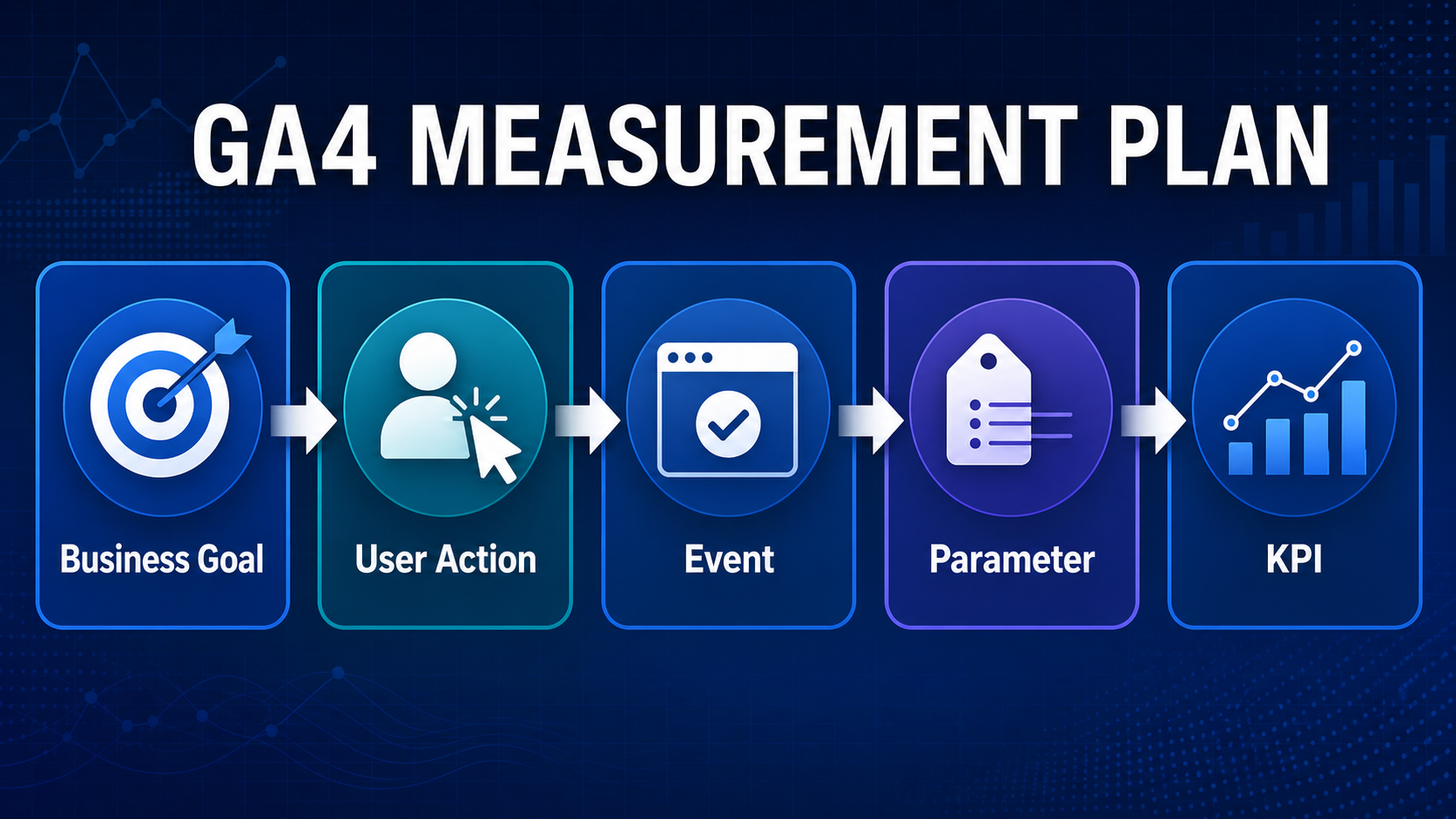
- Define questions and KPIs first, then set events, parameters, and Key event to avoid collecting all data before deciding how to use it.
- Use cross-analysis of sources, landing pages, content engagement, and funnel drop-offs to identify the pages and steps most worth optimizing.
- Every insight should map to a change, an owner, and a validation cycle so GA4 can become a continuous optimization tool.
In LeadsTech’s practical work, a GA4 measurement plan starts with business goals and only then defines the events, parameters, and Key event needed. That keeps reporting connected to web and customer journey analytics instead of simply increasing the tracking volume.
1. What business questions should GA4 website analysis answer first?
GA4 uses an event-based data model. Interactions such as page views, scrolling, site search, form starts, and purchases can all be described with events and parameters. Enterprises should not begin with how many visitors they have. They should first list the decisions they need to make, such as which market deserves more investment, which product pages generate qualified inquiries, where visitors drop off in a form, and whether a content revamp has increased engagement.
We recommend dividing metrics into three layers. The first layer is business outcomes, such as qualified inquiries, bookings, and revenue. The second layer is behavioral signals, such as form start rate and the progression rate from product pages to the contact page. The third layer is diagnostic data, such as source, device, region, and loading speed. This layered structure helps teams avoid mistaking an increase in engagement time for final performance.
Suppose an industrial equipment exporter sees organic search traffic continue to grow, but inquiries do not rise at the same pace. The marketing team can compare generate_lead, form starts and submissions, CTA clicks, and subsequent CRM qualification status across regions and key landing pages to determine whether the issue comes from imprecise traffic, insufficiently persuasive content, or excessive form friction.
2. How should you plan GA4 events and Key event?
GA4 Enhanced Measurement can collect page views, 90% scrolls, outbound clicks, site search, and some form interactions when configured appropriately, but enterprises still need to verify whether the events fit their actual website. Google recommends events such as generate_lead, qualify_lead, working_lead, and close_convert_lead for B2B lead processes. Important interactions can be marked as Key event so teams can focus on behaviors that truly affect the business.
Event naming should be consistent, and parameters should only retain data that can be used for analysis, such as form_name, content_group, market, and lead_type. Do not send personally identifiable information such as names, email addresses, or phone numbers into GA4. Before launch, use real-time reports, DebugView, or Tag Manager preview mode to test and confirm that the same submission is not recorded more than once.
3. How can GA4 identify traffic, content, and conversion issues?
Standard reports are suitable for regularly monitoring traffic sources, content, and Key event. Explorations are better for answering deeper questions with free-form, funnel, and path analysis. In practice, start by selecting one outcome metric, then break it down layer by layer: which channels generate the most qualified inquiries, which landing pages have traffic but a low progression rate, whether different devices drop off at the same step, and whether new and returning visitors behave differently.
Performance evaluation should not rely on a single percentage. A B2B website can track the progression rate from landing page to form page, form start rate, completion rate, qualified Lead ratio, and response time at the same time. An e-commerce site can track product views, add-to-cart, checkout, and purchases. Comparing against your own historical baseline first, then segmenting by channel and device, usually reveals real problems more effectively than applying generic industry averages.
Pay attention to data latency, thresholds, and sampling during analysis. GA4 data may change while it is being processed, and Explorations may not fully match standard reports. For standard properties, event-level data retention can be set to a maximum of 14 months, and this setting mainly affects non-aggregated data such as explorations and funnels. Enterprises that need longer-term or more granular analysis can evaluate BigQuery export, while also planning cloud costs, permissions, and data governance.
4. How can GA4 become a continuous optimization workflow?
The most effective approach is to turn analysis into a fixed cycle: define goals, set events, analyze funnels, and validate website changes. Each month, select one or two of the largest drop-off points, such as a low progression rate from product pages to the contact page. Develop a specific hypothesis, then adjust the CTA, content order, or form fields. Before and after the change, compare performance using the same event definitions and a sufficient observation period. Track the traffic mix at the same time to avoid misreading seasonal changes or advertising budget shifts as design impact.
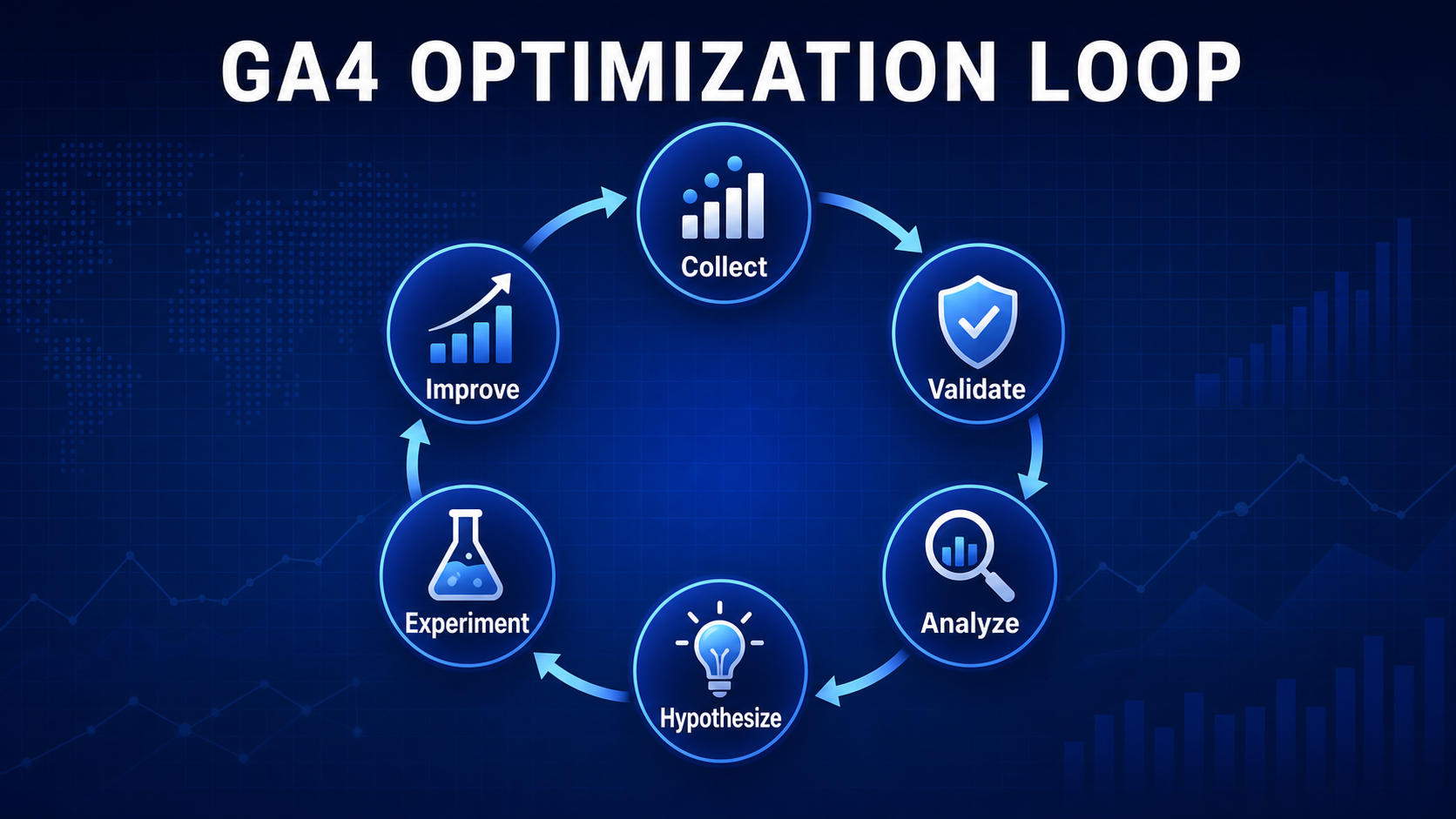
GA4 website optimization loop: from goals and KPIs, events and parameters, and source and drop-off analysis to comparison and iteration.
5. GA4 implementation and checklist
- Have business outcomes such as inquiries, bookings, purchases, or downloads been clearly defined?
- Do the main events use consistent naming and include the necessary parameters?
- Is Key event marked only for truly important behaviors, rather than every click?
- Have internal traffic, test environments, and duplicate events been excluded?
- Can form starts, submissions, and CRM qualification status be cross-checked?
- Does the team have UTM naming standards to prevent source data fragmentation?
- Do Consent Mode, Cookie consent, and personal data processing comply with market requirements?
- Have data retention, BigQuery permissions, and report owners been configured?
- Does every report have a clear audience, decision purpose, and review frequency?
- Is every optimization documented with its hypothesis, change date, result, and next step?
6. Frequently Asked Questions (FAQ)
Can GA4 directly tell me what to improve on my website?
No. GA4 can show where users drop off, how channels differ, and what behavior patterns appear, but improvement methods still need to combine page content, UX, technical performance, and sales feedback, then be validated through website changes or testing.
Which events should enterprises set as Key event?
Prioritize events directly related to business outcomes, such as generate_lead, completed bookings, or purchase. Micro-interactions can be used as diagnostic indicators, but they should not all be marked as Key event.
Does the number of GA4 form submissions equal the actual number of Leads?
Not necessarily. Duplicate submissions, spam inquiries, and technical errors can all create discrepancies. Enterprises should compare GA4 with CRM or backend records and track qualified Leads instead of looking only at submission volume.
Why are the numbers in different GA4 reports not exactly the same?
Common reasons include differences in data processing time, identity, thresholds, sampling, attribution, and filters. Before comparing, align the date range, metric definitions, time zone, and segments.
When should an enterprise move from GA4 to a more comprehensive analytics solution?
When an enterprise needs to integrate websites, apps, CRM, and offline channels, or requires longer-term, more granular analytics with stricter governance, it should evaluate BigQuery, customer journey analytics, or enterprise-grade analytics platforms instead of simply adding more GA4 reports.
7. Conclusion
When using Google Analytics for website analysis and optimization, the key is to start from business questions, build reliable events, and connect insights to actual changes. Enterprises can begin with one core conversion path, complete tracking validation, and establish a monthly optimization cycle. If you need to review your GA4 structure, website customer journey, or data integration, LeadsTech can help assess your current setup and discuss the next step.


8. Further Reading
- Website Analytics Strategy: From Data to Growth Actions
Learn more about how to connect analytics results to priorities and execution plans. - Website Analytics Tools Compared: Features, Pros and Cons, and Selection Criteria
Compare the applicable scenarios and governance requirements of different analytics tools. - Adobe Analytics and GA4: An In-Depth Comparison
Understand enterprise options as data volume, analytics depth, and integration requirements increase.
Related Articles

Enterprise AI MarTech Trends Analysis 2024-2029 Outlook Report
From AI content productivity tools to a core engine for revenue growth and marketing transformation
*The PDF will be sent directly to your inbox.
Email Error
Please enter a valid email address.
Thank You!
The whitepaper has been sent to your inbox. If you don’t see it, please check your spam or promotions folder.

