
AI Overviews combine information from multiple web pages into AI-generated summaries with supporting links. Your business may see changes in organic traffic, click-through rates, or brand visibility without knowing whether to prioritize content, schema markup, or technical settings. At LeadsTech, we recommend first checking whether your content can be crawled, your answers are clear, and your business information is consistent. Those findings should guide your priorities for structured data and page optimization. Drawing on Google’s official guidance, this article explains the work that affects eligibility and visibility, the shortcuts to ignore, and a practical 90-day implementation plan.
Key Takeaways (TL;DR)
AI Overviews do not appear for every query, and there is no separate submission process or guaranteed way to be included. A page must first be indexed by Google and eligible to display a snippet. Google recommends established technical SEO practices, reliable people-first content, internal links, a good page experience, high-quality images, and accurate business information. In 2026, Search Console began testing a separate generative AI performance report, but the feature is still rolling out in stages. Your team should assess search visibility alongside website engagement and conversions.
1. What Are AI Overviews, and Which Queries Trigger Them?
AI Overviews are a generative AI feature in Google Search designed to help people quickly understand more complex questions and find relevant links to explore further. Google displays them only when its systems determine that an AI-generated summary adds value to traditional search. As a result, the same question can produce different layouts depending on the time, region, language, or device—or no AI Overview at all.
AI Overviews and AI Mode may use different models and techniques, so their answers and links can differ. Do not treat a single search result as a fixed ranking or assume that the top traditional result will necessarily become the main supporting source.
2. Basic Eligibility for Appearing in AI Overviews
To appear as a supporting link in AI Overviews or AI Mode, a page must be indexed by Google and eligible to display a snippet in Google Search. Traditional SEO issues—including robots.txt, noindex, canonical tags, server status, JavaScript rendering, internal links, and duplicate content—therefore still directly affect eligibility for AI search.
Google does not provide an additional AI Overview application form or require special schema markup. Meeting the requirements does not guarantee crawling, indexing, or display. Its systems still make those decisions based on relevance, quality, user needs, and search policies.
3. Six Ways to Improve AI Overviews Visibility
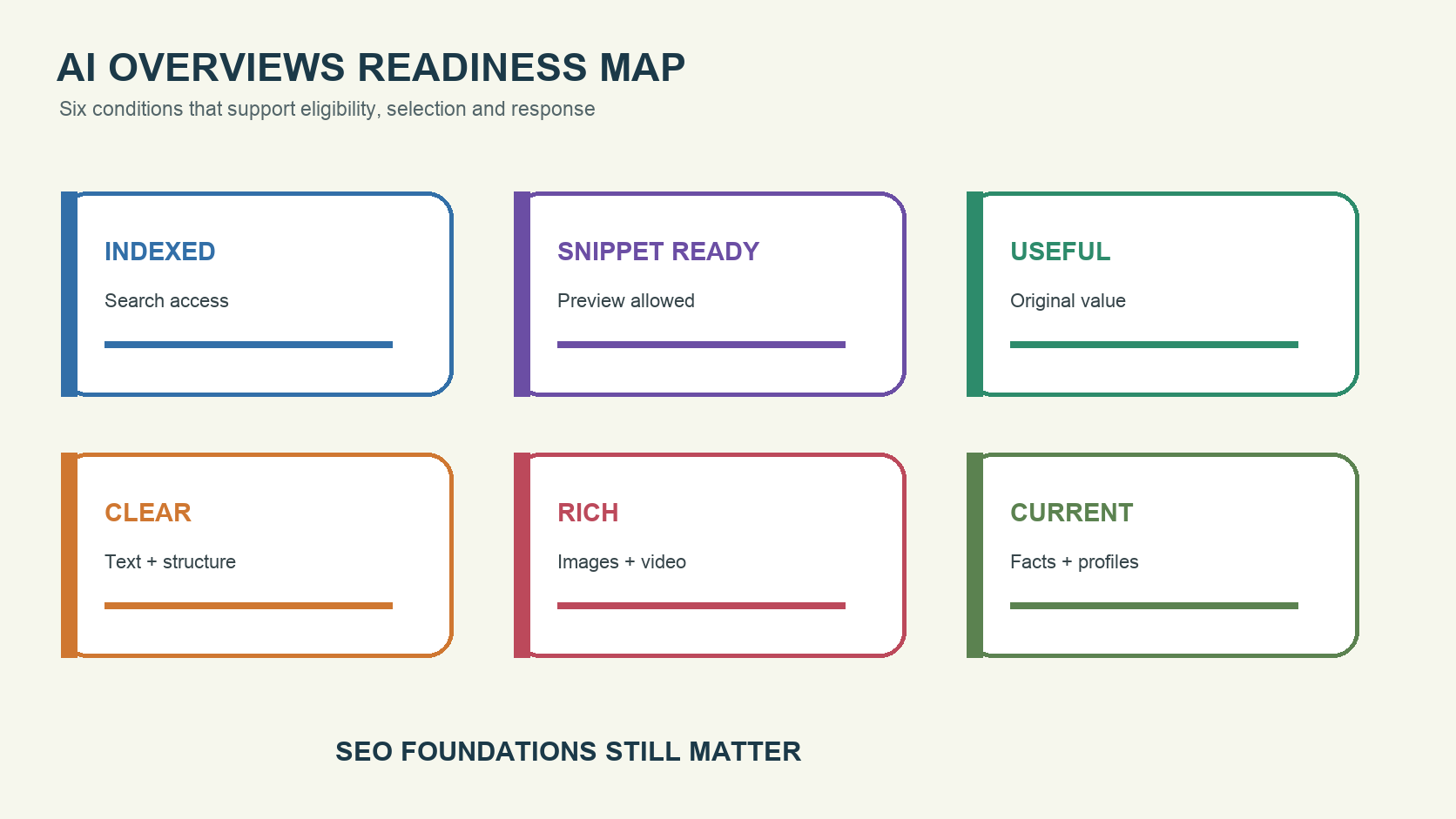
1. Resolve Indexing and Preview Eligibility Issues First
Use URL Inspection in Search Console to check the HTML Googlebot sees, the canonical URL, indexing status, and the last crawl date. Look for accidental noindex or nosnippet settings and overly restrictive max-snippet values. Also confirm that your CDN, WAF, and cookie interface do not block important content.
2. Build Pages Around Real Buying Decisions
AI Overviews often address questions that require information from several perspectives. Create content on selection criteria, comparisons, cost drivers, implementation steps, limitations, and common mistakes instead of relying on claims that you are a leading provider. Give each page one primary purpose and connect it with relevant product, service, and case study pages through internal links.
3. Offer Content Readers Cannot Find Everywhere
Repeating common information from the web does little to distinguish your content. Firsthand experience, original frameworks, documented methods, calculations, real case studies, expert authors, and verifiable data can add value that other pages lack. Cite the source, date, and limitations of numerical claims. Do not generate fabricated statistics that merely look precise.
4. Present Essential Information Clearly in Text
Do not put important answers only in images, videos, interactive tools, or downloadable PDFs. Use descriptive H2 headings, short paragraphs, steps, comparisons, and FAQs. Answer the question directly before adding conditions and examples. The goal is to make content easy to scan and understand, rather than mechanically breaking an article into numerous small fragments.
5. Add High-Quality Images, Videos, and Structured Data
Where appropriate, add original images and videos that explain processes, products, or comparisons, with accurate alt text, titles, and surrounding text. Structured data should match visible content and use only schema types appropriate for the page. It can support traditional search presentation, but it does not guarantee inclusion in an AI Overview.
6. Keep Business and Product Information Current
Businesses with physical locations should maintain accurate addresses, phone numbers, hours, and categories in Business Profile. E-commerce teams should keep product, pricing, and availability information current in Merchant Center. Company, author, product, contact, and policy pages should also be consistent so that Google does not encounter contradictory information across sources.
4. Which Common GEO Tactics Do Not Help?
Google’s official guidance says you do not need to create llms.txt files, dedicated AI text files, or special schema markup for generative AI search. There is also no need to force content into fragments, create nearly identical pages for every long-tail variation, or rewrite articles solely for AI. Google’s systems can understand synonyms and multiple related topics within a page.
Buying inauthentic mentions introduces another risk. High-quality third-party discussions can provide market evidence, but bulk low-quality links, fake reviews, and forum spam may trigger spam detection systems. Invest in research, tools, case studies, and expert perspectives that deserve to be cited.
5. Hypothetical Example: Optimization for an Enterprise Software Service Provider
Suppose an ERP integration service provider ranks in traditional search for “ERP systems,” but an AI Overview does not cite its content for “how midsize manufacturers can compare cloud ERP implementation options.” Its website has product descriptions but lacks comparison criteria, cost factors, data migration guidance, integration risks, and an implementation checklist.
The team could start with a neutral selection guide covering company size, process complexity, integration, regional compliance, total cost of ownership, and vendor capabilities. It could then link that guide to product pages, implementation services, published case studies, and author pages. In parallel, the technical team would fix canonical and internal linking issues, the content team would add an original evaluation worksheet, and the sales team would track the quality of opportunities generated after visitors download it.
For testing, establish a baseline using query, page, and country trends in Search Console, then track engagement with high-intent content and conversions in the CRM. If impressions increase but queries are irrelevant, refine the content’s scope and CTAs instead of simply chasing inclusion in a summary.
6. How to Measure AI Overviews in Search Console
In June 2026, Google announced phased testing of a generative AI performance report in Search Console, providing dedicated visibility reporting for AI Overviews, AI Mode, and generative features in Discover. Initially available to selected sites, it shows impressions, the pages that appear, countries, devices, and dates. The data also continues to count toward the overall Performance report.
If the separate report is not yet available in your account, monitor impressions, clicks, pages, and query trends for Web search, then use Google Analytics to assess time spent on the site, engagement, and conversions after visitors arrive. Search Console provides search performance data, while Analytics reflects on-site behavior. Their numbers will not match exactly because they use different calculation methods.
Look beyond CTR. AI summaries may change click patterns, but visitors with more specific needs may engage more meaningfully. Analyze the pages receiving impressions, branded searches, content engagement, inquiries, qualified leads, and revenue together.
7. A 90-Day Optimization Plan
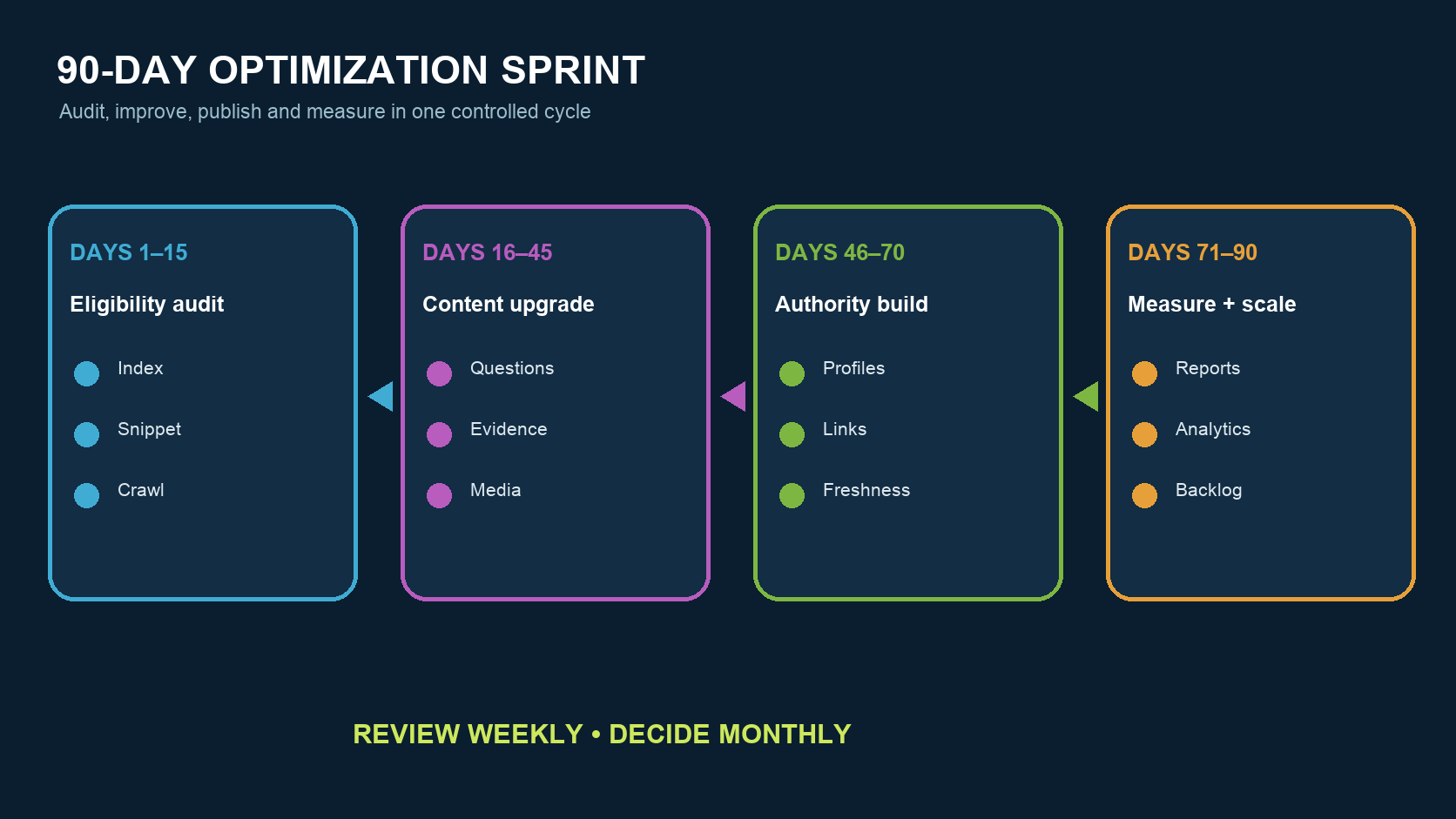
- Days 1–15: Check indexing, canonical tags, snippet controls, internal links, text on core pages, and your Search Console baseline.
- Days 16–45: Improve five to ten pages around high-value questions, adding direct answers, original evidence, limitations, images, and effective CTAs.
- Days 46–70: Align company, author, product, Business Profile, or Merchant Center information, and earn authentic, relevant citations.
- Days 71–90: Compare Search Console, the generative AI report if available, Analytics, and CRM data to build the next content backlog.
Review technical and content progress weekly, but assess visibility trends monthly. Do not make sweeping rewrites because your content fails to appear in a single search. Avoid dedicating all your resources to AI Overviews at the expense of traditional search, website experience, and conversions.
8. Frequently Asked Questions
Will AI Overviews Replace Traditional Search Results?
Not completely. AI Overviews appear only when Google determines they add value. Other organic, image, video, business, or product results still appear on the page.
Do I Need New Schema Markup to Appear in AI Overviews?
No. Google does not have schema markup specifically for AI Overviews. Existing structured data should still be used correctly and match the content visible on the page.
Does nosnippet Affect AI Overviews?
Yes. nosnippet prevents text snippets and also prevents content from being used directly in AI Overviews and AI Mode. Understand the tradeoffs for your brand, copyright, and visibility before changing it.
Can Search Console Show AI Overview Keywords Directly?
It depends on the features available in your account. Google is gradually rolling out a separate generative AI report, with limited features and site coverage initially. Overall search data remains in the Performance report.
How Long Does AI Overviews Optimization Take?
There is no fixed timeline. Crawl frequency, indexing, competition, content quality, and whether the feature is triggered all affect results. Evaluate trends over at least several weeks to months, and do not make promises based on a single test.
9. Conclusion
Improving AI Overviews visibility still starts with helping Google access your pages, understand your content, and trust your evidence, while giving visitors a good experience after they click. Address eligibility issues first, then improve the core pages that influence customer decisions. Use Search Console, Analytics, and CRM data to verify the value of that work. If you need a technical audit, content strategy, or a measurement approach for generative search, explore LeadsTech’s SEO and GEO optimization services or contact our team.


10. Further Reading
- SEO, GEO, and AI Search Growth Strategies: Increase Brand Visibility and Business Opportunities: Connect AI search visibility to overall growth.
- How Does a CMS Affect SEO? A Guide to Optimizing Your Content Management System: Examine how your content platform affects crawling, structure, and updates.
- How to Choose an SEO/GEO Consultant or Service Provider: A Complete Evaluation Guide: Establish criteria for evaluating provider capabilities, methods, and measurement.
Related Articles

Enterprise AI MarTech Trends Analysis 2024-2029 Outlook Report
From AI content productivity tools to a core engine for revenue growth and marketing transformation
*The PDF will be sent directly to your inbox.
Email Error
Please enter a valid email address.
Thank You!
The whitepaper has been sent to your inbox. If you don’t see it, please check your spam or promotions folder.

