
Magnolia CMS Multilingual Development: Site Architecture & Content Reuse
Content Management System (CMS), Magnolia CMS
24 July 2026
- Introduction: Common Multilingual Project Challenges
- Question 1: Website Architecture Structure
- Question 2: Language and Regional Content Design
- Question 3: Component and Content Reuse
- Question 4: Module and Configuration Management
- Question 5: Publishing Workflow and Acceptance Testing
- Frequently Asked Questions (FAQ)
- Conclusion
- Introduction: Common Multilingual Project Challenges
- Question 1: Website Architecture Structure
- Question 2: Language and Regional Content Design
- Question 3: Component and Content Reuse
- Question 4: Module and Configuration Management
- Question 5: Publishing Workflow and Acceptance Testing
- Frequently Asked Questions (FAQ)
- Conclusion
Executive Summary
Successful multilingual Magnolia CMS development requires more than adding language options. It depends on clearly defining the relationships among sites, languages, markets, and content. This article explains how to build a scalable multilingual architecture across five areas—site trees, internationalized fields, content reuse, module design, and release validation—while reducing duplicate development and long-term maintenance risks as new markets are added.
When a company manages multiple markets, LeadsTech first clarifies language, content reuse, and regional publishing ownership while planning corporate website and CMS architecture services, then determines the right Magnolia modules and implementation approach.
1. Introduction: Common Challenges in Multilingual Projects
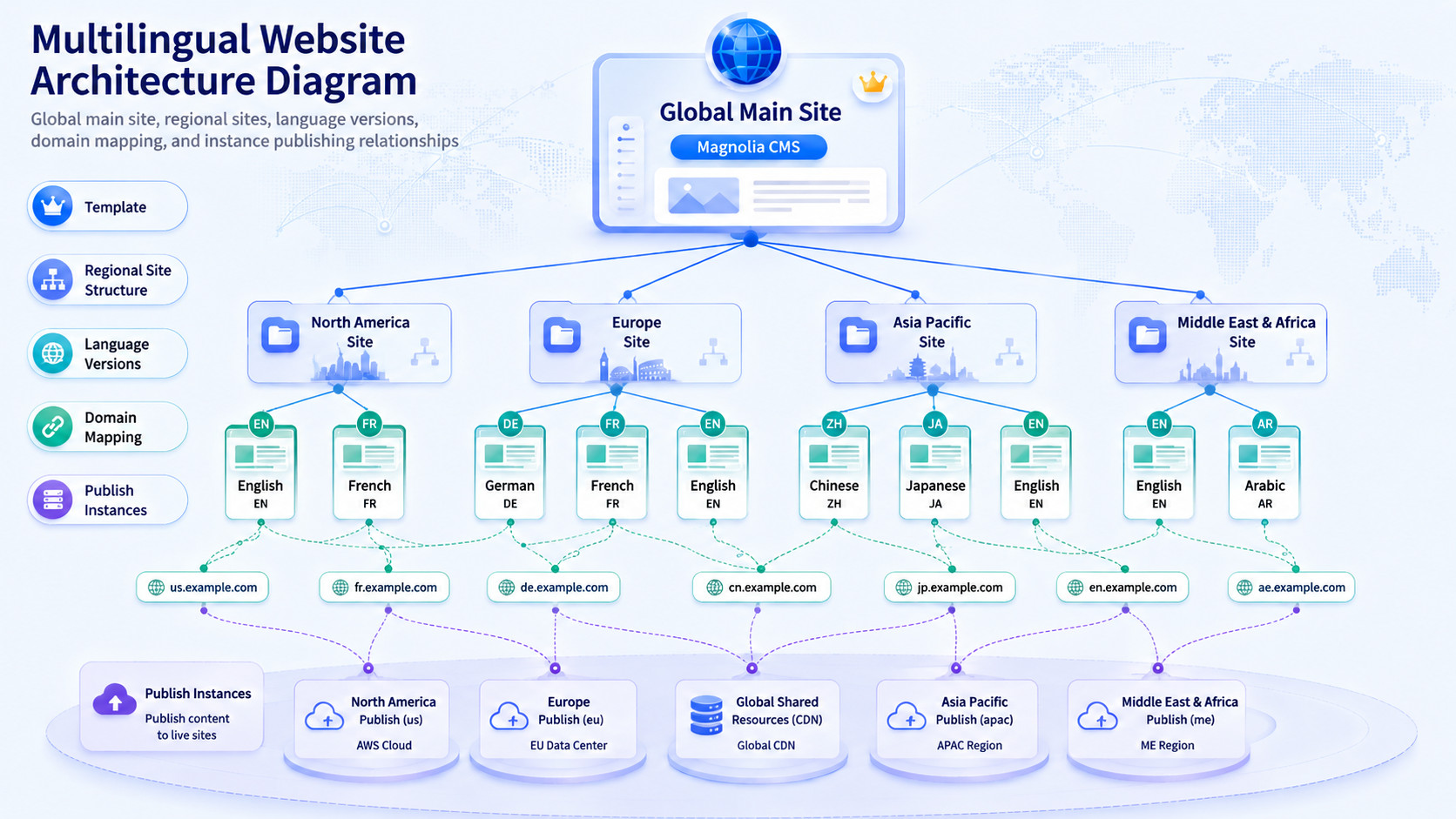
Many Magnolia CMS development projects appear straightforward when the first English-language site goes live. Yet once German, French, Japanese, or regional sites are introduced, page duplication, component forks, configuration overrides, and publishing conflicts often emerge at the same time. The issue is usually not a lack of platform capability, but the absence of an early decision about which content should be shared globally and which content may vary locally.
For a global corporate website built on Magnolia CMS, the development team should first define the boundaries of content variation, then determine how to structure the site tree, site definitions, templates, and modules. Magnolia supports multilingual content trees and can also manage multiple monolingual or multilingual sites through Multisite. The right structure should reflect domains, information architecture, permissions, publishing cadence, and localization requirements rather than defaulting to a single tree model.
In this article, “multilingual site architecture” refers to the coordinated planning of site definitions, language configuration, content models, permissions, domains, and publishing workflows within one Magnolia instance. The goal is to maximize reuse of global content while allowing regional markets to localize within clearly governed boundaries.
2. Question 1: Should the Site Tree Be Structured by Language or Market?
At the start of a Magnolia CMS development project, the first task should not be creating localized pages. It should be determining whether the business needs language variants of the same site or separate sites for distinct markets.
When markets share broadly the same information architecture, product portfolio, case studies, regulatory content, and CTAs, a single primary site with multilingual content can work well. When regions differ significantly in branding, domains, page structures, publishing schedules, or content permissions, separate site definitions are generally the better choice.
Magnolia’s Multisite module can manage multiple websites in one instance, with independent templates, themes, domains, locales, and inheritance rules for each site.
Start by answering three questions:
How Significant Are the Content Differences?
Define an internal threshold for content variation. If most pages need to be rewritten, reorganized, or populated with different product and compliance information, evaluate a market-based site structure first.
Does the Region Have Independent Publishing Authority?
If regional teams need to launch campaigns and pages independently, isolate their permissions and site root paths.
Do Domain and SEO Strategies Differ?
Country-specific domains, directory structures, and URL strategies should be established at the site-definition stage.
3. Question 2: How Should Localized Fields, Regional Variations, and Content Fallbacks Be Designed?
A second common challenge in Magnolia CMS development is combining UI language, content language, and market-specific content within the same field model. Editors then struggle to understand which fields require translation, while developers cannot reliably determine what to display when localized content is missing.
A more robust approach is to organize content into three layers:
Global Facts Layer
Product models, technical specifications, brand names, certification numbers, and similar facts should not be maintained separately for each language.
Translatable Content Layer
Headings, body copy, buttons, SEO fields, image captions, and downloadable materials.
Regional Operations Layer
Case studies, contacts, events, service commitments, legal notices, and market-specific CTAs.
Magnolia typically stores internationalized content as properties with language suffixes. When using the Delivery API, teams should configure internationalization according to the endpoint type and define explicit language-selection and fallback rules. The default nodes and properties endpoints do not automatically return localized values based on the client language, so this behavior should not be left to ad hoc front-end logic.
4. Question 3: How Should Components and Structured Content Work Together?
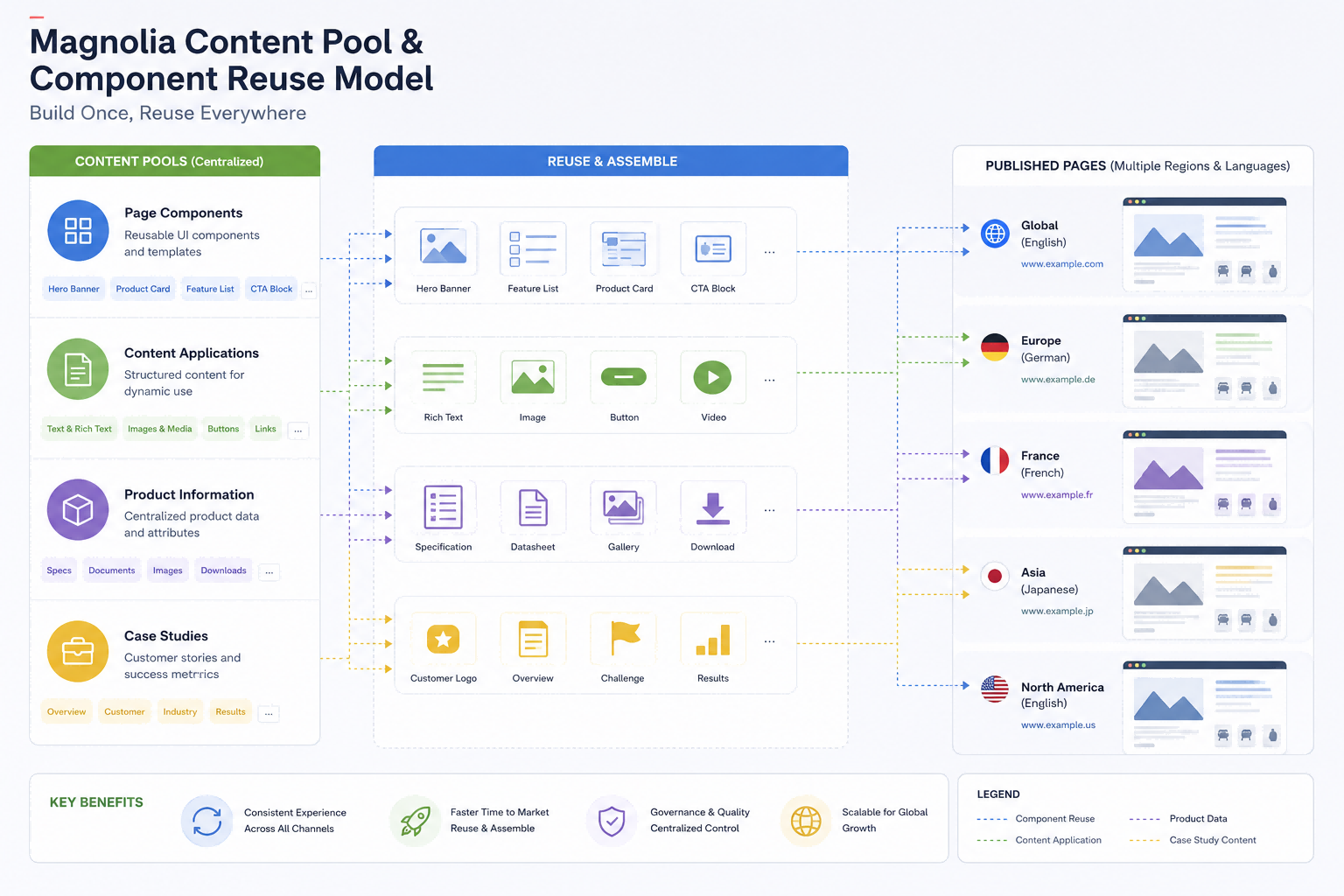
Well-designed Magnolia CMS development should not place every piece of content directly inside page components. Components are best suited to presentation and interaction, while highly reusable information—such as products, case studies, events, experts, locations, and downloadable assets—should be managed centrally in structured content pools.
Magnolia’s documentation describes how editors can maintain content items through a Content App and reference them from components across multiple pages, eliminating duplicate data entry.
A practical division of responsibilities is as follows:

Components Handle Presentation
Examples include hero sections, product cards, case study lists, download links, and CTAs.

Content Pools Manage Facts
Examples include product attributes, customer case studies, regional contacts, and resource files.

Pages Orchestrate the Experience
Select components and content items for each market instead of duplicating entire pages.
This model is particularly effective for global corporate websites built on Magnolia CMS. When headquarters updates a product record, every language site can reference the same current information, while regional teams maintain only local case studies and market-specific messaging.
5. Question 4: How Can Modules and Configuration Avoid Copy-and-Paste Duplication?
Placing all Magnolia CMS configuration in a single module may simplify deployment in the short term, but it eventually creates unwanted dependencies among templates, dialogs, site definitions, permission settings, and environment parameters. A more sustainable design separates modules by core, site, and business capabilities.
Recommended module boundaries include:
Core Module
Shared components, base fields, common styles, and utility classes.
Site Module
Site definitions, themes, page templates, language settings, and domain mappings.
Feature Module
Product centers, case study libraries, resource downloads, forms, and marketing campaigns.
Integration Module
CRM, PIM, DAM, search, and third-party integrations.
Magnolia recommends defining templates, dialogs, apps, and other configurable items in YAML. Implementation teams can reuse core capabilities and override only the market-specific differences through definition inheritance, decoration, or modular configuration. A Maven Module is required when custom Java code is involved.
6. Question 5: How Should Publishing, APIs, and Acceptance Testing Be Designed?
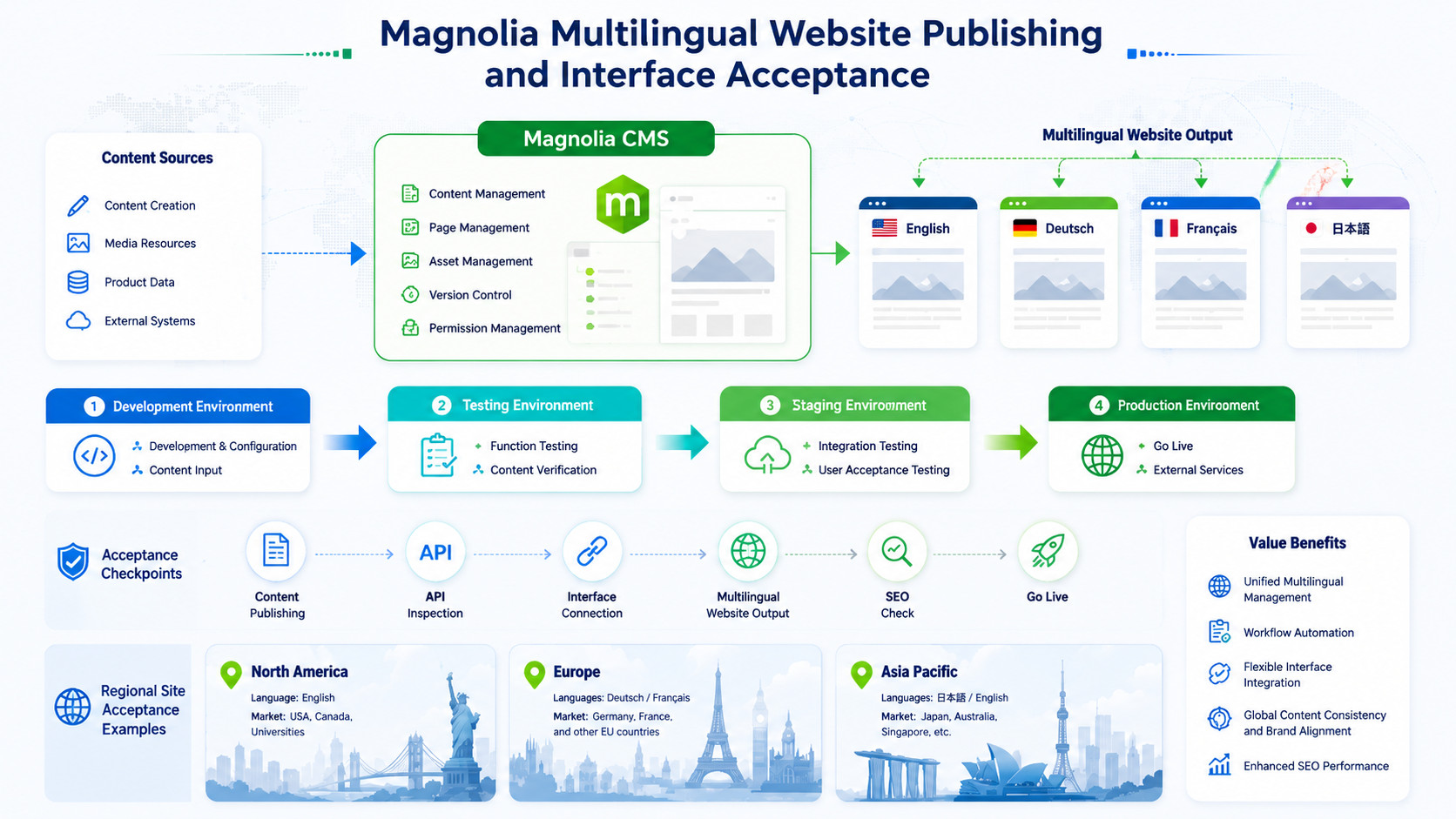
As a Magnolia CMS development project moves into delivery, one critical question is often overlooked: can content be published safely to the correct market? Multilingual projects should test more than visual presentation. Acceptance testing should also cover site mappings, language switching, content fallback, caching, API fields, and permission boundaries.
Include the following items in the acceptance checklist:
Domain and Language Mapping
Verify that domains, site root paths, and locales are mapped correctly.
Regional Editing Permissions
Confirm that regional editors can modify only authorized sites and content.
Cross-Market Impact
Assess whether changes to pages, components, or content pools affect other markets.
API Language Fallback
Ensure APIs return the requested language and handle missing fields correctly.
Publishing Scope
Confirm that publishing tasks can be scoped by site or content path.
Magnolia uses module descriptors to identify modules and their dependencies. A Light Module uses module.yaml in the module root, while a Maven Module uses an XML descriptor under META-INF/magnolia. Configuration, code, and dependencies should be version-controlled together throughout deployment and release management, rather than being changed manually only in the production authoring environment.
7. Frequently Asked Questions (FAQ)
What Is the Difference Between Multilingual Content and Multiple Independent Sites in Magnolia?
Multilingual content is appropriate when a site’s information architecture and business rules remain largely consistent and language is the primary difference. Multiple independent sites are better when markets differ significantly in domains, content structures, permissions, product portfolios, or publishing workflows.
Does the Magnolia Delivery API Automatically Return Content in the User’s Language?
Not necessarily. The default nodes and properties endpoints do not automatically select localized values based on the client language. Projects must explicitly handle language selection according to endpoint configuration, property naming, and internationalization settings, and define fallback rules for missing translations.
How Should Responsibilities Be Divided Between Page Components and Content App Content?
Page components manage layout, interaction, and content composition. Products, case studies, contacts, and downloadable assets that need to be reused across pages or sites are better modeled as structured content types and maintained centrally through a Content App.
When Should You Use a Light Module or a Maven Module?
Use a Light Module when templates, dialogs, apps, content types, and front-end resources can be configured in YAML. Use a Maven Module when the project requires custom Java classes, complex back-end logic, or compiled dependencies.
8. Conclusion
A truly scalable multilingual project does not simply duplicate more pages. It establishes clear boundaries for sites, content, and modules. The long-term value of Magnolia CMS development depends on whether global content can be reused, regional variations can be governed, and new markets can be launched without rebuilding the core architecture.
When selecting a Magnolia CMS implementation partner, enterprises should evaluate expertise in content modeling, site architecture, module governance, API integration, and multi-environment publishing—not merely the ability to assemble pages.
For organizations expanding continuously across markets, Magnolia CMS development should be treated as content operations infrastructure rather than a one-off corporate website project. Explore LeadsTech’s enterprise website and CMS services, or visit Contact Us to discuss multilingual architecture, module design, and implementation planning.


Further Reading
- Magnolia CMS for Global Brands: Enterprise Content Management and Modular Architecture
Learn how Magnolia supports enterprise content modeling, modular extensibility, and multisite management. - Five Localization Strategies for Multilingual Corporate Websites and a Guide to CMS Selection
Explore how multilingual content, regional operations, and CMS governance work together.
Related Articles

Enterprise AI MarTech Trends Analysis 2024-2029 Outlook Report
From AI content productivity tools to a core engine for revenue growth and marketing transformation
*The PDF will be sent directly to your inbox.
Email Error
Please enter a valid email address.
Thank You!
The whitepaper has been sent to your inbox. If you don’t see it, please check your spam or promotions folder.

