
Website Security Testing Consultants: Fixes, Retesting, and Monitoring
Content Management System (CMS)
14 November 2026
Does your security report list problems that never make it off the to-do list? You may need a website security consultant when no one can assess the risks, fixes stall across teams, or problems reappear after a redesign. This guide explains what a consultant should deliver and how to verify fixes and hand over ongoing work.
Summary (TL;DR)
A website security consultant turns findings into tasks backed by evidence and assigned to specific owners. Define who tests, who implements fixes, who retests, and who monitors the site. Measure progress by time to address high-priority issues, recurring problems, and retest results. Report length alone tells you little about progress.
1. When Do You Need a Website Security Consultant?
An outside consultant can help interpret findings and coordinate teams when tools produce too many alerts, maintainers disagree about the cause, or the same problem returns after each redesign. If your team can already confirm, fix, and verify issues, bring in help for the remaining gaps.
LeadsTech offers website security testing and optimization to help businesses assess risks, prioritize findings, and plan fixes. Start by explaining your critical functions and who owns them today. Then decide whether you need diagnosis, implementation support, or ongoing improvement.
A public product page and a member-only quote portal, for example, carry different data risks and require testing different user roles. A consultant needs to understand the business rules to turn technical findings into decisions managers can make.
2. How Does a Consultant Coordinate Teams?
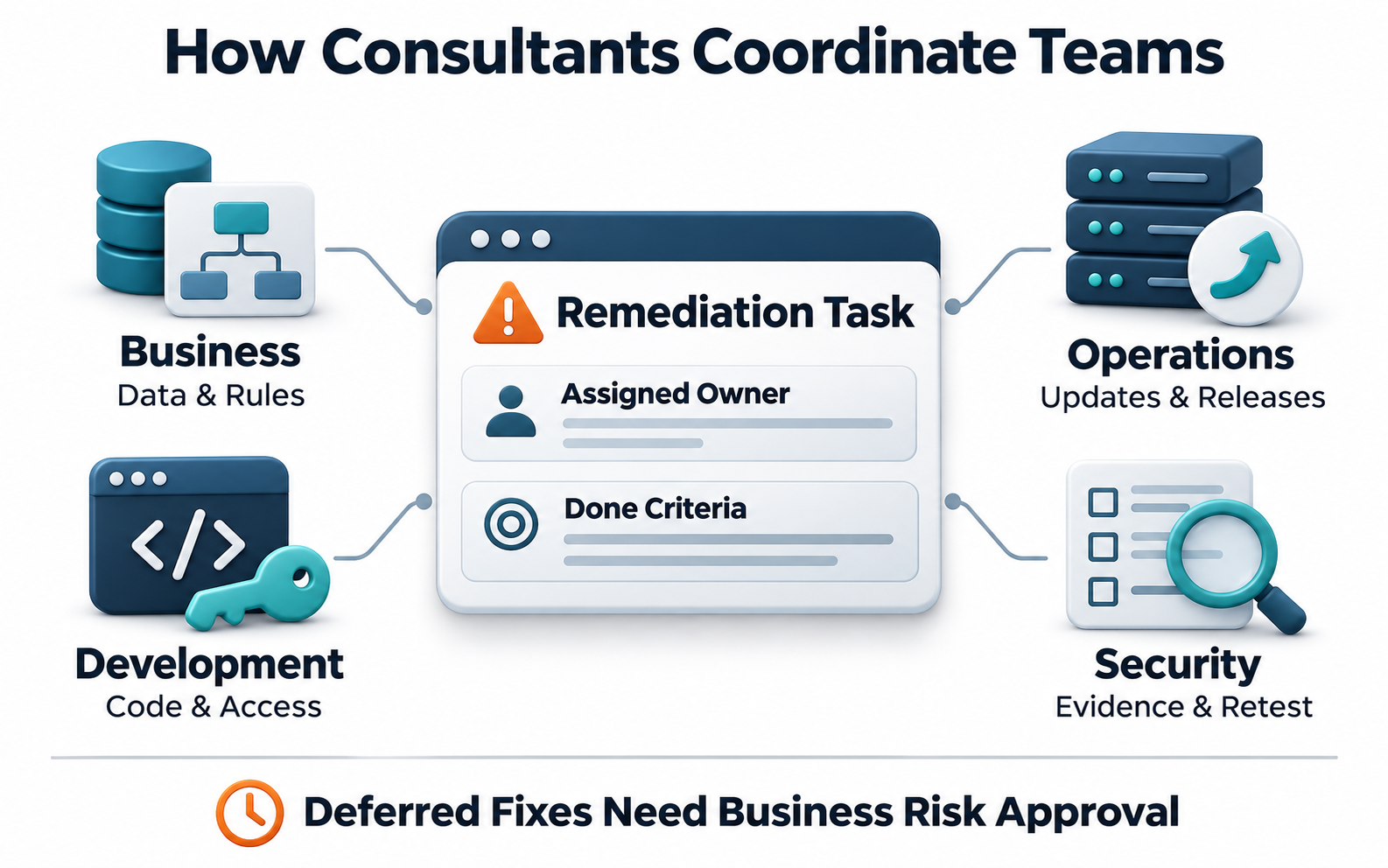
Business teams explain how data is used and which rules govern each workflow. Developers handle code and permissions. Operations teams or hosting providers coordinate environments, updates, and releases. Security specialists verify the evidence and confirm that fixes work.
A consultant should assign each finding to a specific owner and follow it through. When shared platforms or third-party services are involved, clarify who will contact the provider and what counts as completion.
If a fix has to wait, document the remaining impact, interim measures, and the date for another review. The person authorized to accept the business risk should approve the decision.
3. What Should a Consultant Deliver?
Start with the scope, including sites, admin areas, user roles, data interfaces, and exclusions. Then ask for actionable findings that explain the conditions, evidence, business impact, and recommended fixes, with confirmed issues separated from alerts that still need investigation.
Clarify what implementation covers. A report may recommend a code change without including the work. Ask who will make the change, when it will go live, who will handle problems after release, and whether retesting costs extra.
Ask for a process your team can take over, including an asset inventory, update records, a point of contact for alerts, and operating instructions. At sign-off, have an internal team member run through the process to check that the handover works in practice.
4. Example: A Portal Maintained by Multiple Vendors
Suppose a developer, a hosting provider, and an internal team jointly maintain a business portal. A report flags document access problems and outdated packages, but nobody takes ownership. Customer data stays at risk, and the next redesign is difficult to schedule.
The consultant can confirm the affected roles and versions, assign permission fixes to the developers, and ask the maintenance team to schedule package updates. The teams then agree on release and retest dates, with evidence and completion criteria for each task.
Track how long high-priority issues stay open, which fixes pass retesting, what problems recur, and whether regular functions still work. This hypothetical example shows how to measure the team’s response capability and offers no guarantee against future incidents.
5. How Do You Make Monitoring Part of Daily Operations?
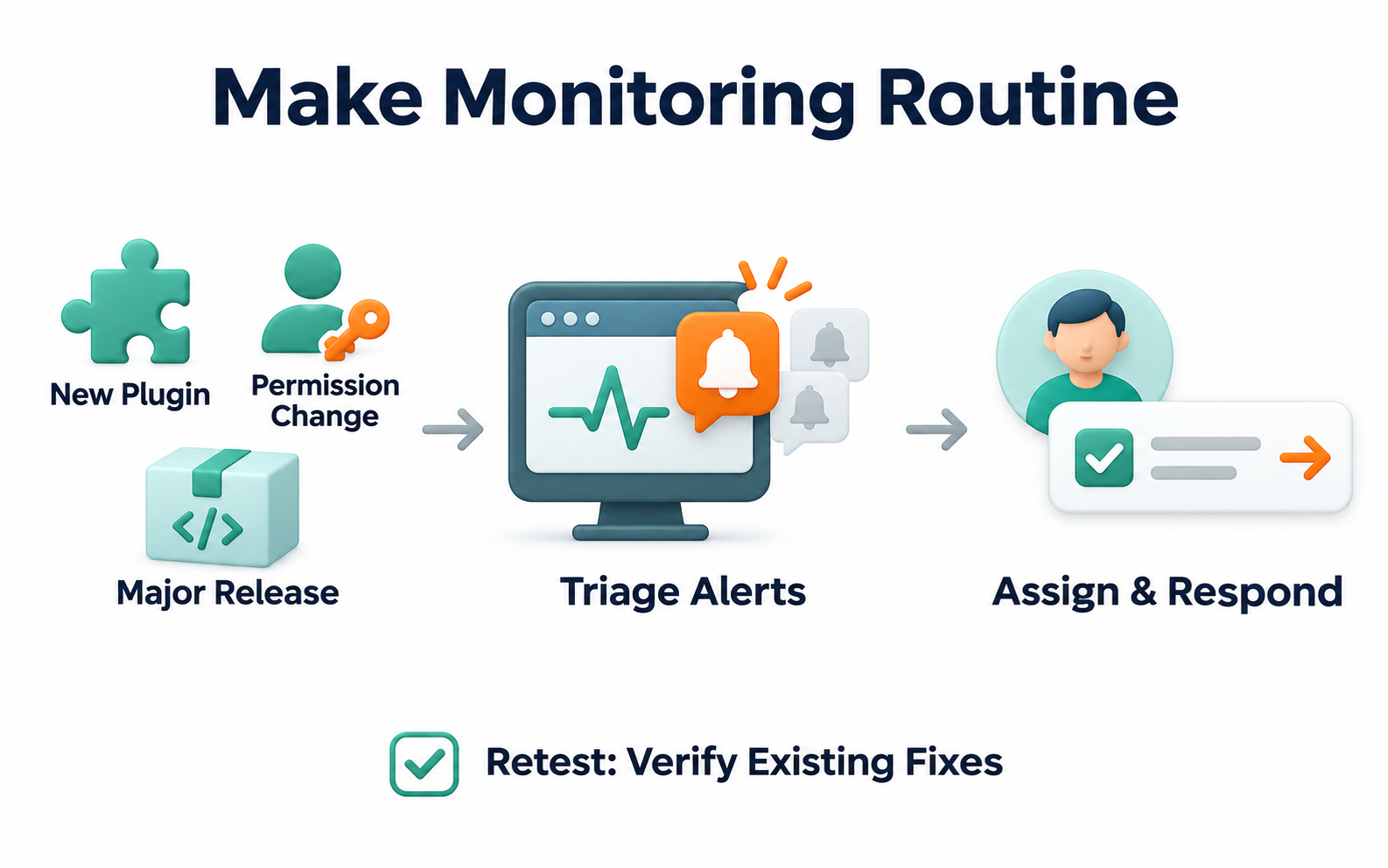
Retesting checks whether known problems were fixed. Monitoring looks for new changes to the website and its environment. Build both into the same process so fixes are verified and new issues are caught.
Treat new plugins, permission changes, and major releases as triggers for review. Define who receives alerts, how they assess them, and what they do next. During regular reviews, check whether too many low-value alerts are slowing responses to genuine issues.
6. Six Checks for Choosing a Consultant
- Can the consultant explain the test scope in terms of your data and business workflows?
- Are findings clear, reproducible, and backed by evidence?
- Is ownership clear for recommendations, implementation, release, and retesting?
- Can the consultant coordinate with your existing development and maintenance teams?
- Does the agreement specify monitoring hours, response coverage, and escalation contacts?
- Will the handover include account access, documentation, and training for your team?
7. Frequently Asked Questions
Do we need a security consultant if we already have a maintenance provider?
Check what your provider can handle. If they can diagnose, fix, and retest issues, you may only need additional help for specific gaps.
Will the consultant fix every vulnerability directly?
That depends on the agreement. Recommendations, implementation, and third-party updates can have different owners. Define them before work starts.
Does ongoing monitoring include a round-the-clock response?
Monitoring tools, staffed hours, and incident response are separate services. Confirm what is covered in the agreement.
Does a drop in findings mean the engagement is working?
Compare the testing scope, versions, retest results, and remaining risks. Fewer findings can also reflect narrower coverage.
8. Conclusion
A website security consultant should help your team build a process it can keep running. Identify gaps in diagnosis, remediation, or coordination, then verify the work with evidence and a process your team can take over.

If you need to connect testing, fixes, and day-to-day operations, talk to LeadsTech about your current website risks and how your teams divide the work.

9. Further Reading
- What Is a Content Management System (CMS)? A Guide for Enterprise Websites
Learn the basics of website content management, platform selection, and routine maintenance.
- Global Website CMS: A Guide to Multilingual and Multinational Content Management
Plan ownership and content workflows across multiple sites and regions.
Related Articles

Enterprise AI MarTech Trends Analysis 2024-2029 Outlook Report
From AI content productivity tools to a core engine for revenue growth and marketing transformation
*The PDF will be sent directly to your inbox.
Email Error
Please enter a valid email address.
Thank You!
The whitepaper has been sent to your inbox. If you don’t see it, please check your spam or promotions folder.